WordPress powers about 43% of all websites on the internet. WooCommerce runs roughly 33% of all online stores worldwide. So if you want to sell digital products online and you already have a WordPress site, the natural question is: how do I actually do this?
The answer is more confusing than it should be. There are too many plugins, too many payment processors, and too many “build your own everything” tutorials. Most of them are written by people trying to sell you their plugin. None of them tell you the full picture.
In this article, I’ll give you the full picture. The 4 things every digital product business needs, the realistic options for each piece, and the cleanest stack to put together in 2026. Whether you sell one ebook or run a full software business, the principles are the same.
No fluff. Just what works.
What counts as a digital product

Before we get into the how, let’s define what we are talking about. A digital product is anything that gets delivered electronically (no physical shipping). Common examples:
- Ebooks and PDFs
- Online courses and video tutorials
- WordPress plugins and themes
- Desktop software and mobile apps
- SaaS subscriptions
- Stock photos, illustrations, icons, fonts
- Design templates (Figma, Canva, Notion)
- Music tracks and audio samples
- Membership site access
- Premium articles, newsletters, or research reports
- Event tickets and webinar access
- Coaching sessions delivered via video calls
- Print-on-demand digital files (sublimation designs, SVGs)
Each of these has slightly different needs. A PDF needs file delivery. A plugin needs license keys. A SaaS needs subscriptions. A membership needs gated access. The good news: one well-built setup can handle most of them.
The 4 pieces every digital product business needs
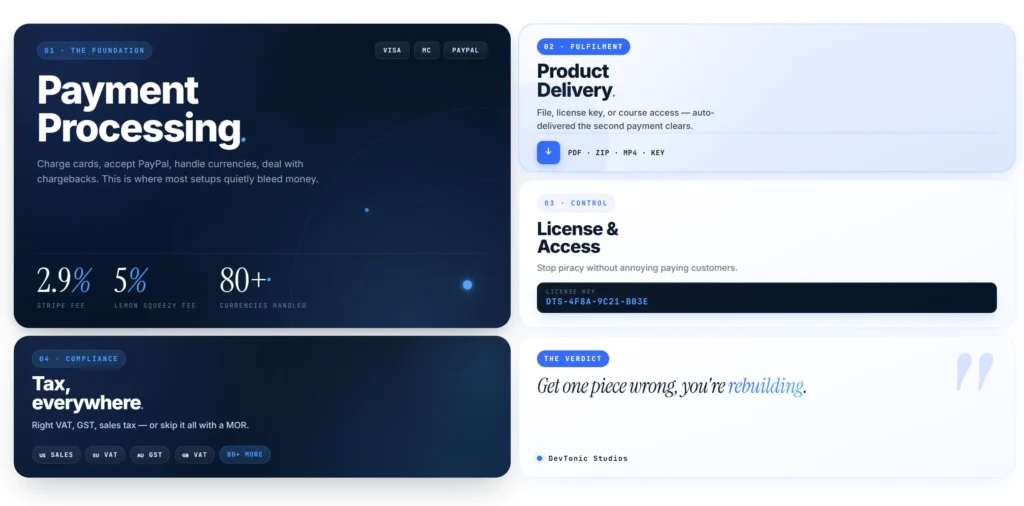
Strip away the noise and a digital product business comes down to four pieces:
1. Payment processing. A way to charge cards, accept PayPal, handle currencies, deal with chargebacks.
2. Product delivery. Sending the customer their file, license key, course access, or download link automatically after payment.
3. License or access control (for products that need it). Limiting who can use your software, view your course, or download your file.
4. Tax compliance. Charging the right VAT, GST, or sales tax based on where the customer lives. Filing those taxes with the right governments.
Most “how to sell digital products on WordPress” guides only cover piece 1 and 2. They skip 3 and 4 because those are hard. That is exactly why so many WordPress sellers end up with broken pirated software and surprise tax bills.
Let’s go through all four.
Piece 1: Payment processing
You have three main paths.
Stripe (or PayPal)
The default. Stripe takes 2.9% + 30 cents per transaction. You install a Stripe plugin (free with WooCommerce) and you can take cards.
The catch: when you use Stripe, you are the legal seller. That means you handle all the tax compliance for every country you sell to. For one country, fine. For 30 countries, a nightmare.
Lemon Squeezy (merchant of record)
Lemon Squeezy charges 5% + 50 cents per transaction as the base fee. They are the legal seller, not you. They charge VAT and sales tax based on where the customer lives. They file the taxes. You get paid the net.
A note on fees: the 5% + 50¢ is the base rate. Additional fees apply for international cards (+1.5%), PayPal (+1.5%), and subscription payments (+0.5%). Your real per-transaction cost lands between 5.5% and 8% depending on what payment methods your customers use and where they are.
The catch: higher per-transaction fee than Stripe. But you skip all the tax work.
Paddle, FastSpring, Gumroad
Other merchant-of-record services. Similar model to Lemon Squeezy with different fee structures and integration depth. We compared them in our Merchant of Record for WordPress guide.
For most small sellers selling globally, the merchant of record path wins. The 2-3% extra fee is way less than what you’d pay an accountant to handle global tax compliance.
Piece 2: Product delivery
After the customer pays, they need to get their thing. The delivery method depends on what you sell.
File downloads (ebooks, PDFs, audio, video, design files)
WooCommerce has built-in support for downloadable products. You upload the file, set a download limit and expiry, and customers get a link in their order email and on the My Account page.
For larger files, host them on Amazon S3, Backblaze B2, or Cloudflare R2 and link from WooCommerce. This avoids slowing down your WordPress server with download traffic.
Plugins that improve this: Easy Digital Downloads (full alternative to WooCommerce for digital), File Manager Pro for download protection.
License keys (plugins, themes, software, SaaS)
You generate a unique key for each customer and they activate it inside your software. This requires a license server.
Two paths: build your own license API (lots of work) or use Lemon Squeezy’s License API (zero infrastructure on your side). The full breakdown is in our Software License Management for WordPress guide.
Course / membership access
If you’re selling course access or membership content, you need a learning management plugin or membership plugin to gate the content. Common options:
- LearnDash ($199/year) for full LMS features
- TutorLMS (free + paid addons) for simpler course delivery
- MemberPress ($179/year) for membership sites
- Restrict Content Pro for paywalled content
These all integrate with WooCommerce so a purchase grants access automatically.
Recurring access (subscriptions)
If you sell subscriptions (monthly courses, ongoing software updates, membership renewals), you need recurring billing. WooCommerce Subscriptions costs $279/year or you can use Lemon Squeezy + a payment gateway plugin to skip that fee. Full details in our Sell Subscriptions on WordPress without WooCommerce Subscriptions guide.
Piece 3: License and access control
For products that need protection (software, courses, premium content), you need a way to enforce who can use what.
For software: Lemon Squeezy License API or a license server plugin. Activation limits, expiry, deactivation when refunded.
For courses and memberships: the LMS or membership plugin handles access control natively.
For downloads: WooCommerce can limit download counts and link expiry, but it cannot prevent a paying customer from sharing the file. For DRM-protected media, you need specialized hosting like Vimeo (for videos) or a third-party service.
For premium content / paywalled articles: a membership plugin or Patreon-style integration.
Piece 4: Tax compliance

This is the one most WordPress sellers ignore until it’s a problem.
If you sell digital products to customers in:
- The EU → you owe VAT in 27 countries (rates vary by country)
- The UK → separate VAT registration needed since Brexit
- The US → 41 states plus Washington DC tax digital goods (4 states have no sales tax at all)
- Australia, Canada, India, Japan, etc → each has its own GST rules
Thresholds matter and they vary. For EU-established businesses, the EU has a €10,000 (about $10,800) annual cross-border threshold before you must register for the One Stop Shop (OSS) and charge VAT at the buyer’s local rate. Non-EU sellers have no threshold. From your very first sale to an EU consumer, you are legally required to charge their local VAT and remit it.
US sales tax thresholds vary by state, typically $100,000 in sales or 200 transactions per year before you must register in that state. UK, Australia, Canada, and other countries each have their own thresholds.
Three paths:
- Ignore it. Risky. Tax authorities are catching up.
- Hire an accountant to handle global filings. Costs $500 to $2,000 per month for global digital tax compliance.
- Use a merchant of record like Lemon Squeezy that handles all of this for you. Costs 2-3% extra per transaction.
For most small sellers, option 3 is the simplest. Full breakdown in our Merchant of Record for WordPress guide.
The cleanest digital product stack for WordPress in 2026
After looking at all the options, here is the stack I recommend for most digital product sellers using WordPress + WooCommerce:
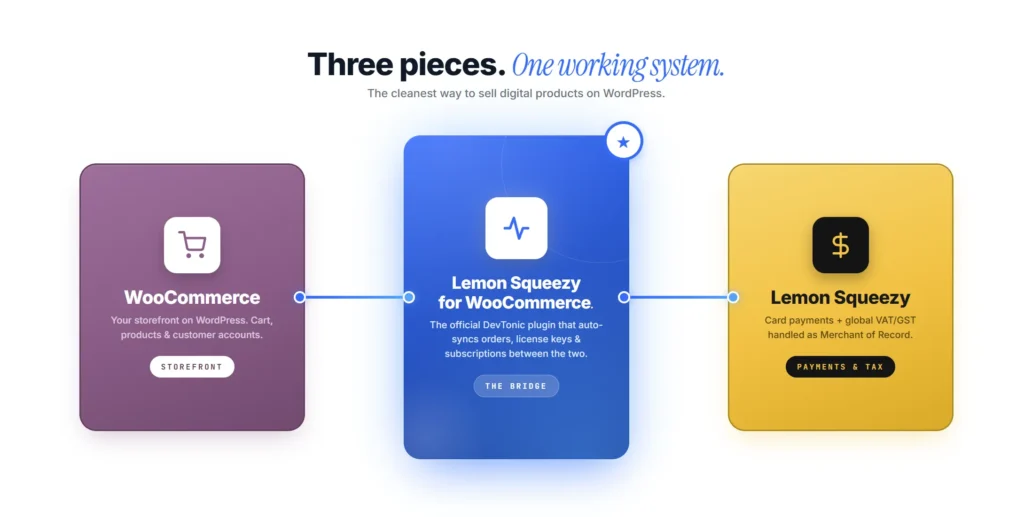
Storefront: WooCommerce (free) Payment + tax compliance: Lemon Squeezy (5% + 50¢ per sale) WooCommerce-Lemon Squeezy bridge: Lemon Squeezy for WooCommerce plugin by DevTonic Studios ($39 yearly or $79 lifetime) Course/membership content (if applicable): TutorLMS, MemberPress, or Restrict Content Pro File hosting (for big downloads): Cloudflare R2 or Backblaze B2
This stack handles:
- Card payments globally
- Subscriptions with auto-renewal
- License keys (auto-generated per sale)
- Failed payment recovery (dunning)
- VAT, GST, US sales tax in 80+ countries
- Customer self-service (cancel, update card, download invoices)
- Refunds processed from WooCommerce admin
Total ongoing cost for a $39 product sale: about $2.50 in fees. No accountant needed for global tax. No license server to maintain. No subscription billing infrastructure.
Setup overview
Step-by-step setup for the recommended stack is documented in detail in our Lemon Squeezy WordPress plugin setup guide. The short version:
- Install WooCommerce (if you don’t have it)
- Sign up for Lemon Squeezy at lemonsqueezy.com
- Create your products in Lemon Squeezy (enable license keys or subscriptions if needed)
- Buy and install the DevTonic Lemon Squeezy plugin
- Add your Lemon Squeezy API key to WooCommerce settings
- Link each WooCommerce product to its Lemon Squeezy variant ID
- Click “Register Webhook” in the plugin (one click)
- Test a purchase using card 4242 4242 4242 4242
- Disable Test Mode and go live
About 15 minutes from start to finish if you have a Lemon Squeezy account ready.
Practical tips for selling digital products successfully
A working stack is only half the battle. The other half is selling.
Price for value, not for hours. Digital products scale infinitely. A $49 plugin is not 5x more expensive than a $9 plugin to maintain. Charge based on what the buyer gets, not what it costs you.
Provide a free version or trial when possible. WordPress users especially expect to try before they buy. A limited free version on WordPress.org for plugins. A 14-day trial for SaaS. A sample chapter for ebooks.
Offer money-back guarantees. A 14-day refund policy is standard. It removes purchase friction. Most customers don’t refund if the product is good.
Send a great onboarding email. First impression matters. A welcome email with setup instructions, links to docs, and a personal note from you converts buyers into long-term customers.
Build SEO-driven content. This article is part of a content cluster on devtonicstudios.com. Every article we publish links back to our plugin. That is how digital product businesses grow on WordPress without paid ads.
Listen to refund reasons. When someone refunds, send a quick email asking why. The reasons reveal what to fix in your product or marketing.
Test the buying flow regularly. Once a quarter, buy your own product on test mode. Make sure emails arrive, license keys work, downloads complete. Bugs in the buying flow lose silent revenue.
Frequently Asked Questions
What is the easiest way to sell digital products on WordPress?
The easiest path is WooCommerce + Lemon Squeezy + the DevTonic Lemon Squeezy plugin. WooCommerce handles your storefront, Lemon Squeezy handles payments and tax compliance globally, and the plugin connects them. Setup takes 15 minutes and works for ebooks, courses, plugins, themes, software, subscriptions, and most other digital product types.
Do I need WooCommerce to sell digital products on WordPress?
No, but it helps. WooCommerce gives you cart, checkout, order history, and customer accounts out of the box. Alternatives: Easy Digital Downloads (designed specifically for digital), SureCart (newer, hosted), or building checkout flows directly with Lemon Squeezy buttons. WooCommerce is the most flexible if you want to sell different types of products in one place.
What does it cost to sell digital products on WordPress?
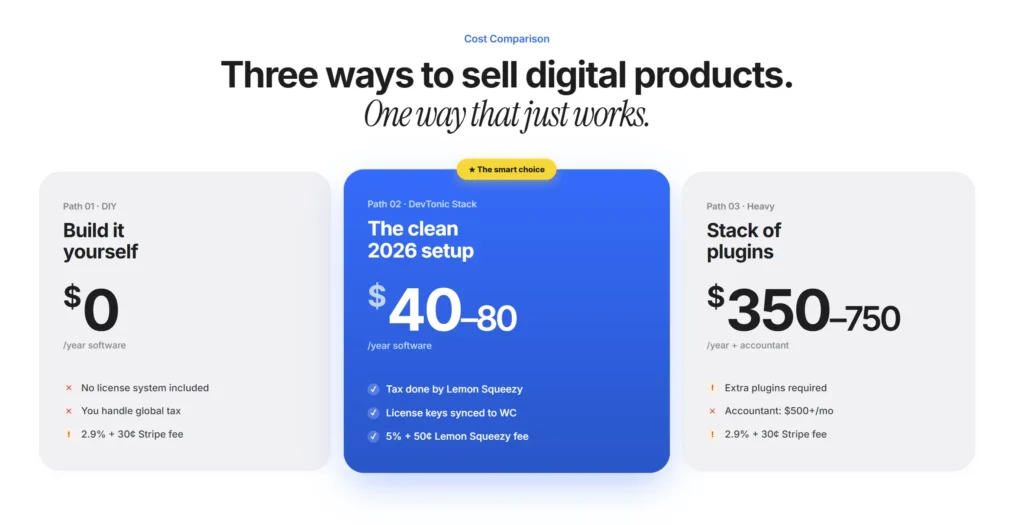
Cheapest setup: WooCommerce (free) + Stripe (2.9% + 30¢ per sale) + your time on tax compliance. About $0 in software costs but high time cost. Recommended setup: WooCommerce (free) + Lemon Squeezy (5% + 50¢ per sale) + DevTonic plugin ($39/year or $79 lifetime). About $40-80 in software costs per year and zero ongoing tax work. Heavy setup: WooCommerce + WooCommerce Subscriptions ($279/year) + license plugin ($199/year) + tax compliance plugin ($249/year) + Stripe fees + accountant. $727+/year in plugins plus $500-2000/month for tax help.
Can I sell digital products without paying transaction fees?
No. Every payment processor takes a fee. Lemon Squeezy is 5% + 50¢. Stripe is 2.9% + 30¢. PayPal is 2.9% + 30¢. The trade-off is what they handle in exchange for the fee. Higher fees = more they handle (tax compliance, fraud, dunning).
What is the best WordPress plugin to sell digital products?
For digital-only stores, Easy Digital Downloads is purpose-built. For mixed stores or if you want maximum flexibility, WooCommerce + a payment gateway like the DevTonic Lemon Squeezy plugin works best. The right pick depends on whether you want digital-only or a flexible cart.
Do I need to charge VAT when selling digital products?
In most cases, yes, when selling to EU consumers. The EU requires you to charge VAT at the customer’s local rate. Same for the UK, Australia, Canada, India, and many other countries. The simplest way to handle this is to use a merchant of record like Lemon Squeezy, which charges and remits all the taxes for you.
How do I deliver digital products automatically after purchase?
WooCommerce can deliver downloadable files automatically via email and the My Account page. For license keys, use Lemon Squeezy’s license feature with the DevTonic plugin to auto-generate and deliver keys. For course or membership access, use an LMS or membership plugin that grants access on purchase. All of this can run automatically with no manual work after setup.
Can I sell digital subscriptions on WordPress?
Yes. Two main ways: install WooCommerce Subscriptions ($199/year) which handles subscriptions inside WordPress, or use Lemon Squeezy + the DevTonic plugin to skip the WC Subscriptions cost and let Lemon Squeezy handle the subscription engine. Full details in our subscription guide.
Wrap-up
Selling digital products on WordPress is one of the best business models on the internet. Low overhead, infinite scale, global market, full control. The hard part is picking the right setup so you don’t waste months stitching plugins together.
For most sellers, the cleanest 2026 stack is:
- WooCommerce as the storefront
- Lemon Squeezy as the payment and tax engine
- DevTonic Lemon Squeezy for WooCommerce plugin as the bridge
- A content marketing strategy to drive organic traffic
This stack handles cards, subscriptions, license keys, tax compliance, and customer self-service. About 15 minutes to set up. About $40 to $80 per year in plugin cost. About 5% + 50 cents per sale in payment fees.
Related deep dives:
- Lemon Squeezy WordPress plugin setup guide – the full step-by-step
- Merchant of Record for WordPress – why MOR matters for global sales
- Software License Management for WordPress – selling software with license keys
- Sell Subscriptions on WordPress without WC Subscriptions – recurring billing without the $199 fee
If you have questions or want help picking the right setup for your specific product, email us at support@devtonicstudios.com.