You built a piece of software. A plugin, a theme, a desktop app, a SaaS tool. You want to sell it from your WordPress site using WooCommerce. But now you hit a wall: how do you actually manage software licenses?
How do you generate a unique license key for each customer? How do you deliver the key automatically after they pay? How does your software check if the license is valid? How do you limit activations to a set number of sites or devices? How do you deactivate a license if someone refunds?
That is software license management and most WordPress sellers massively overcomplicate it. There is a much simpler way in 2026.
Lemon Squeezy for WooCommerce drops each Lemon Squeezy license key straight onto the WooCommerce order and the confirmation email, with no code and a 14-day money-back guarantee.
In this article, I’ll show you what software license management actually needs, the different options for WordPress, and the cleanest setup using Lemon Squeezy as the license server and a WooCommerce plugin to surface everything in WordPress.
What a complete software license system needs
A working license system has four parts. Most WordPress plugins only cover one or two, which is why sellers end up stitching together a mess of tools.
1. License key generation. When a customer pays, a unique key is created for their order. Secure, random, not guessable.
2. License delivery. The customer sees the key. Usually via email, order confirmation page, or account dashboard.
3. License validation. When the customer installs your software, it phones home to check: is this key valid? Is it still within its activation limit? Has it expired? Was it refunded?
4. License management. You (the seller) can see who owns which licenses, activate or deactivate keys, extend expiry dates, reset activation counts if a customer needs to move to a new machine.
Skip any of these and you end up with pirated software, support tickets about lost keys, or customers unable to activate on their new laptop after a refund.
Three ways to handle software licensing on WordPress
Option 1: Build your own license server
You write custom PHP. A database table for licenses. A REST API endpoint for validation. Admin UI to manage them. Then your software calls your server to check keys.
Pros: full control, no fees.
Cons: weeks or months of dev work. Security is your problem (if your license server gets hacked, every license leaks). You maintain the infrastructure forever.
This makes sense only if you are Adobe or Microsoft. For a solo seller, it is way too much work.
Option 2: Use a WordPress license management plugin
Plugins like Software License Manager or Easy Digital Downloads Software Licensing do license management inside WordPress. They generate keys, store them in your WP database, and provide an API endpoint your software calls to validate.
Pros: keeps licenses inside WordPress. Familiar to WP devs.
Cons: your WordPress site becomes the license server. If your site goes down, customer software cannot validate. If your site is slow, activations are slow. Security is still your responsibility.
This works but adds load to your WP site and ties license availability to WordPress uptime.
Option 3: Use a managed license service + WooCommerce integration
A service like Lemon Squeezy generates and validates licenses on their own servers. You sell through WooCommerce. A small plugin pulls the license key into the WooCommerce order and shows it to the customer.
Pros: license server runs on dedicated infrastructure (high uptime, scales automatically, security handled). Zero server code to maintain. Your WordPress site is just the storefront.
Cons: you pay the managed service fees (Lemon Squeezy takes 5% + $0.50 per sale).
For most small software sellers, option 3 is the clean choice. You ship product, not infrastructure.
How Lemon Squeezy handles licenses (the clean way)
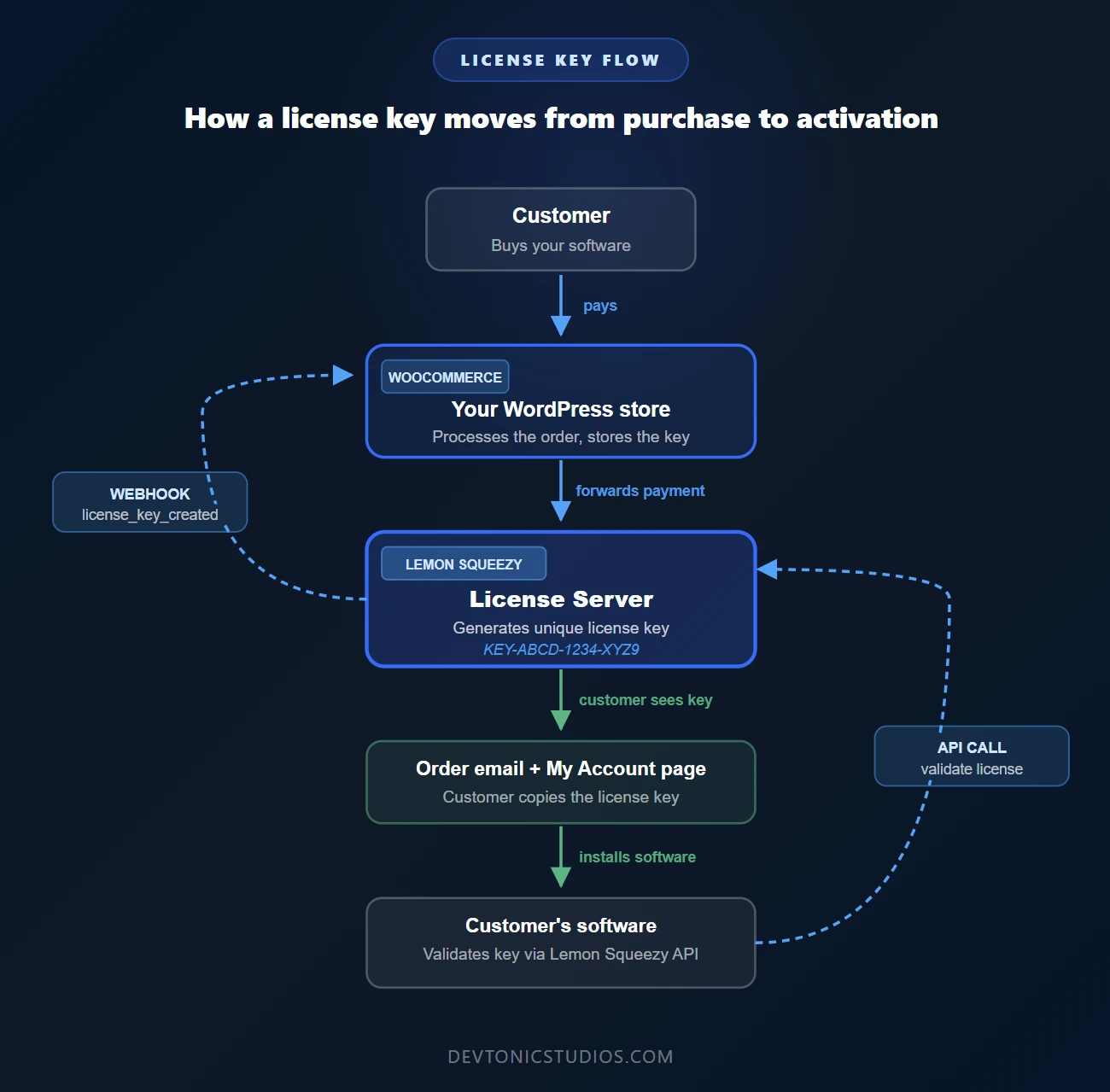
Here is what actually happens when you sell software through Lemon Squeezy:
Customer buys your software on your WooCommerce store
            ↓
Payment processed by Lemon Squeezy (as merchant of record)
            ↓
Lemon Squeezy generates a unique license key
            ↓
Lemon Squeezy sends a webhook to your WooCommerce site
            ↓
Plugin saves the key on the WooCommerce order
            ↓
Customer sees the key in: order email, My Account order page
            ↓
Customer installs your software
            ↓
Your software calls Lemon Squeezy's License API to validate
            ↓
Lemon Squeezy checks: valid? activation limit? expired? refunded?
            ↓
Returns yes or no, with remaining activations
Two servers, two roles. Lemon Squeezy = license server. Your WooCommerce site = storefront. Clean split. Each does what it is good at.
The Lemon Squeezy + DevTonic plugin setup
To make Lemon Squeezy work with WooCommerce, you need a payment gateway plugin. The Lemon Squeezy for WooCommerce plugin from DevTonic Studios does this. It also handles the license key delivery side.
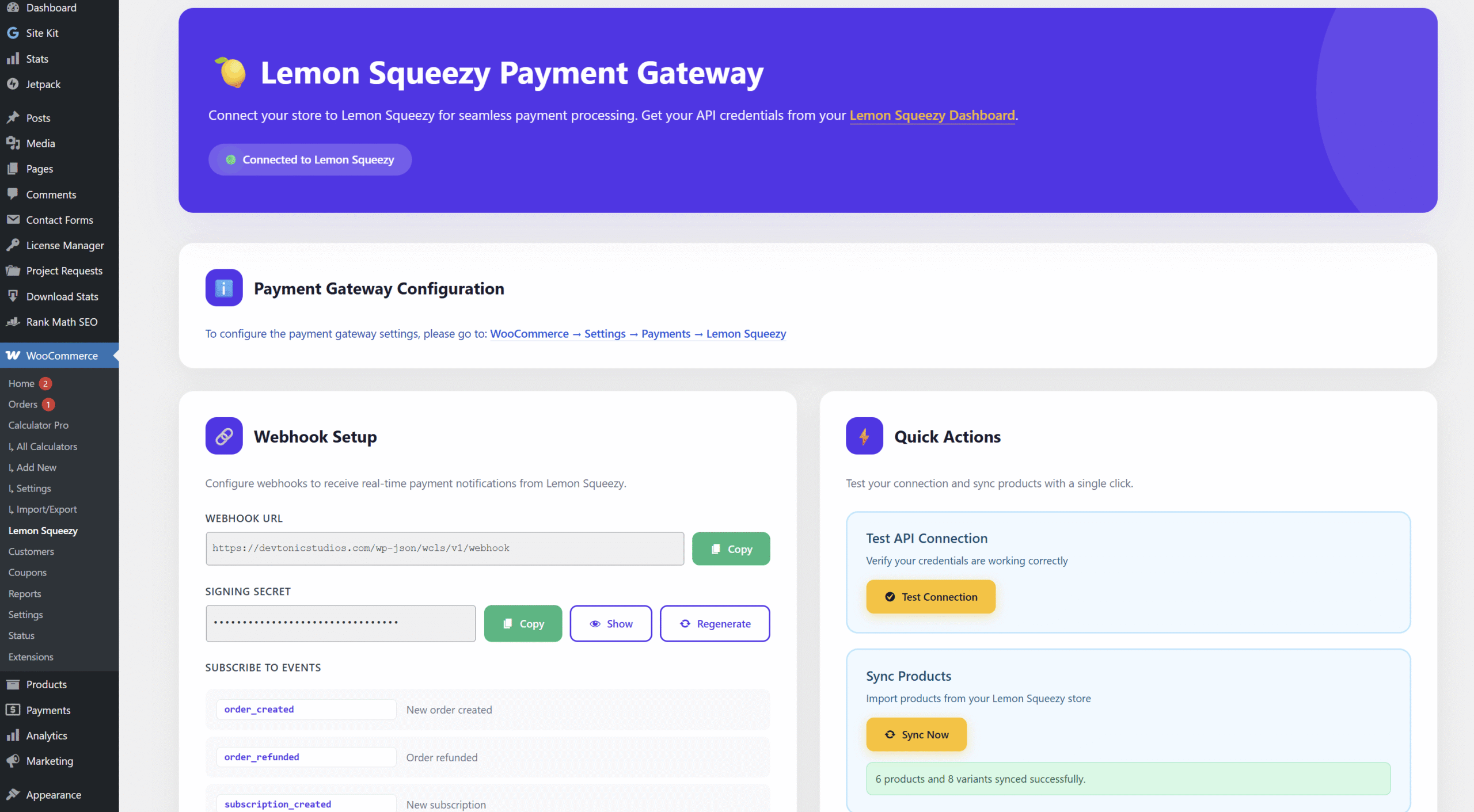
Here is exactly what the plugin does with license keys, based on what is in the plugin code:
When Lemon Squeezy creates a license key, the plugin catches the license_key_created webhook and saves on the WooCommerce order:
- The actual license key
- License ID (so you can reference it in the LS dashboard)
- Status (active, disabled, etc.)
- Activation limit (how many installs the key allows)
- Current instances count (how many activations used)
- Expiry date (if the product has one)
The customer sees the key in two places:
- Order confirmation email (HTML and plain text). The key appears prominently, along with the activation limit.
- My Account order detail page. The key is shown in a copy-friendly code box with status, activation limit, and expiry.
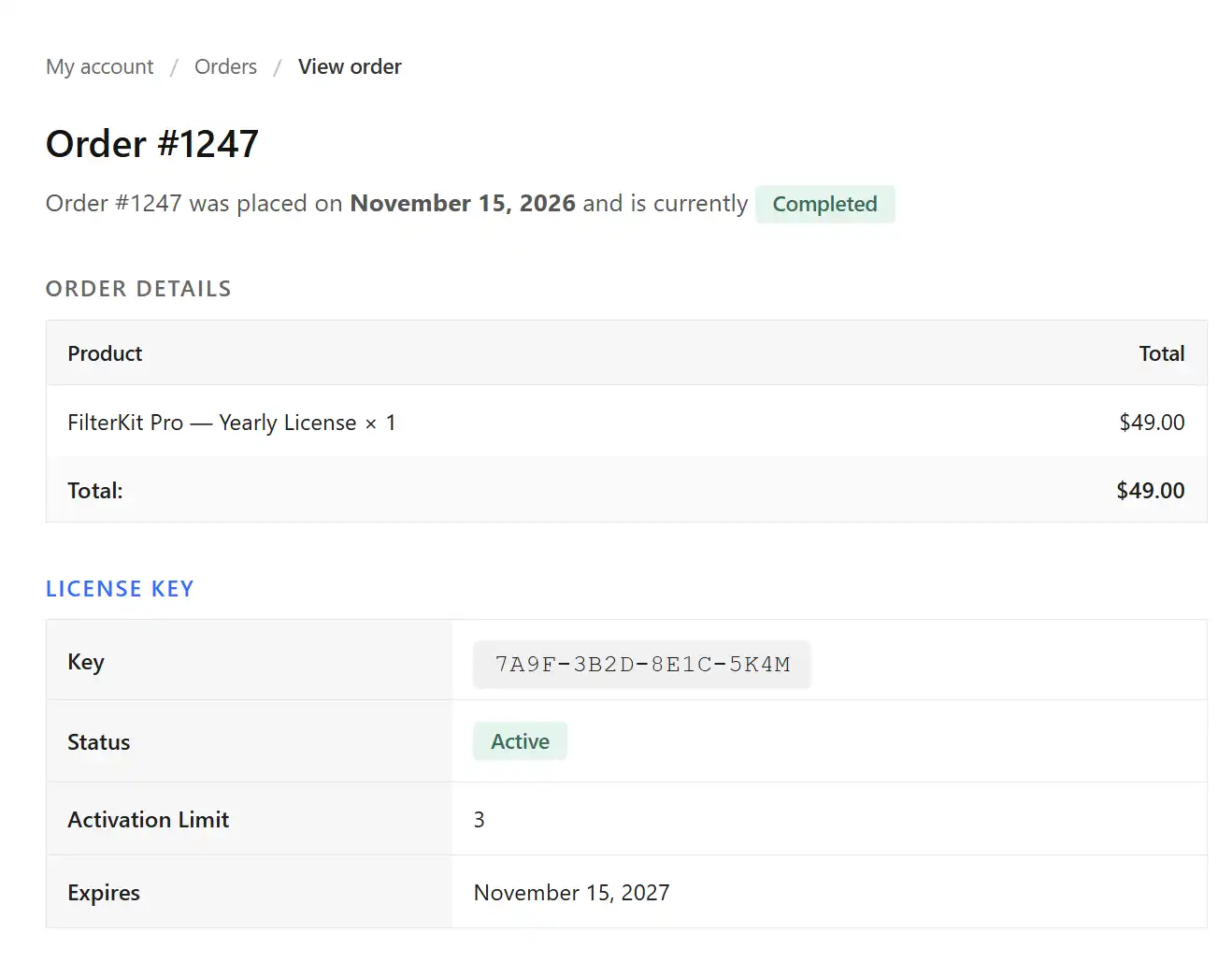
When the license status changes (key disabled, activation count increased, etc.), Lemon Squeezy fires a license_key_updated webhook and the plugin updates the WooCommerce order automatically.
An order note is added when the key is first generated, so you have an audit trail.
Two developer hooks are available if you want to extend behavior:
do_action( 'wcls_license_key_created', $order, $license_key, $event_data );
do_action( 'wcls_license_key_updated', $order, $event_data );
That is the full license handling on the WooCommerce side. It is intentionally focused. The plugin does not try to be a license server. It simply bridges Lemon Squeezy’s license server into WooCommerce so customers can see and use their keys inside your WordPress storefront.
How your software validates the license
This part happens outside WordPress. When a customer installs your software (plugin, theme, app, whatever), your code calls Lemon Squeezy’s License API to check if the key is valid.
The API is simple. A single HTTP POST with the license key, and you get back a response telling you whether the key is valid, how many activations are left, and when it expires.
Lemon Squeezy’s full License API docs are at docs.lemonsqueezy.com/api/license-api. The three main endpoints:
- Activate license – validates a key and registers a new instance (installation)
- Validate license – checks if a key is still valid on periodic checks
- Deactivate license – removes an instance if the customer uninstalls or moves to a new device
You write a few lines of code in your software to call these endpoints. That is it. You don’t need to build a license server, manage a database, or worry about security.
What the plugin does NOT do (honest clarity)
Many WordPress sellers expect a license management plugin to do everything, so let me be clear about what this plugin does NOT handle:
- ❌ Does not generate license keys. Lemon Squeezy generates them.
- ❌ Does not validate licenses inside your software. That is your software calling the Lemon Squeezy License API directly.
- ❌ Does not provide a license validation endpoint on your WordPress site. Your software calls Lemon Squeezy, not WordPress.
- ❌ Does not handle activation / deactivation from the customer side. Again, Lemon Squeezy’s API.
- ❌ Does not have a separate “My Licenses” page. Keys show per WooCommerce order.
This is by design. Lemon Squeezy does license management better than a WordPress plugin can. Putting licenses on dedicated infrastructure (theirs) means your WP site does not have to stay up 24/7 for validation to work.
Who this setup is for
Good fit:
- You sell WordPress plugins or themes that need activation keys
- You sell desktop software (macOS, Windows) that phones home to validate
- You sell SaaS tools where customers download a desktop client
- You sell developer tools, icons, assets that need license protection
- You want subscriptions that auto-generate keys and expire if unpaid
Not the right fit:
- You sell products that don’t need license validation (ebooks, templates, one-time downloads that are not protected)
- You want a license system fully inside WordPress (no external calls)
- You run enterprise sales with complex contracts (use something more custom)
Setup in 5 steps
Full setup steps are in our Lemon Squeezy for WooCommerce setup guide. Short version for license sellers:
- In Lemon Squeezy: create your product. When setting it up, enable “License keys” in the product settings and set the activation limit (e.g. 1 site per key, 3 sites per key, unlimited).
- In WooCommerce: install the DevTonic Lemon Squeezy plugin. Add your API key and Store ID.
- Link the product: paste the Lemon Squeezy variant ID into the WooCommerce product’s “Lemon Squeezy Variant ID” field.
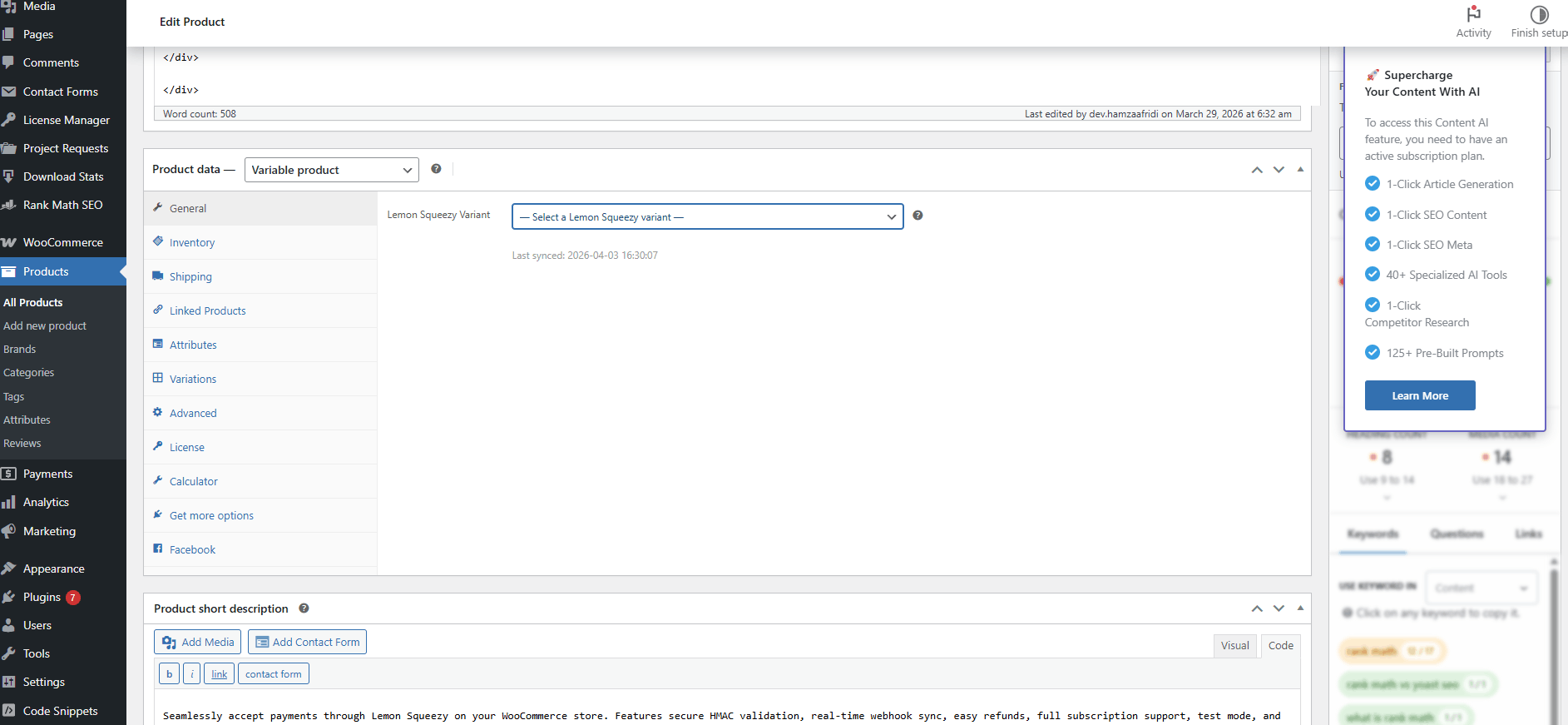
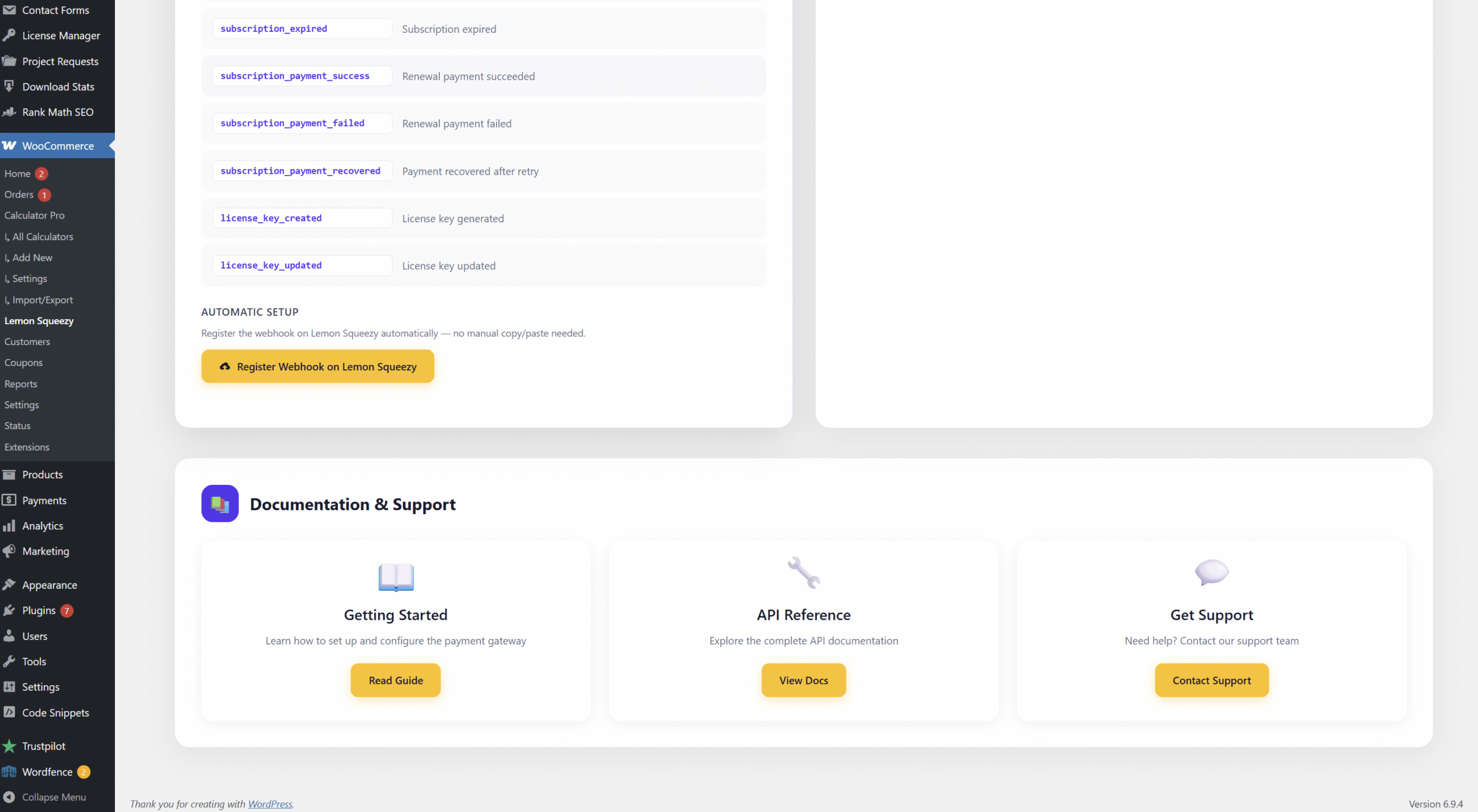
- Register the webhook: one click inside the plugin. This subscribes to the
license_key_createdevent so the plugin receives new keys automatically.
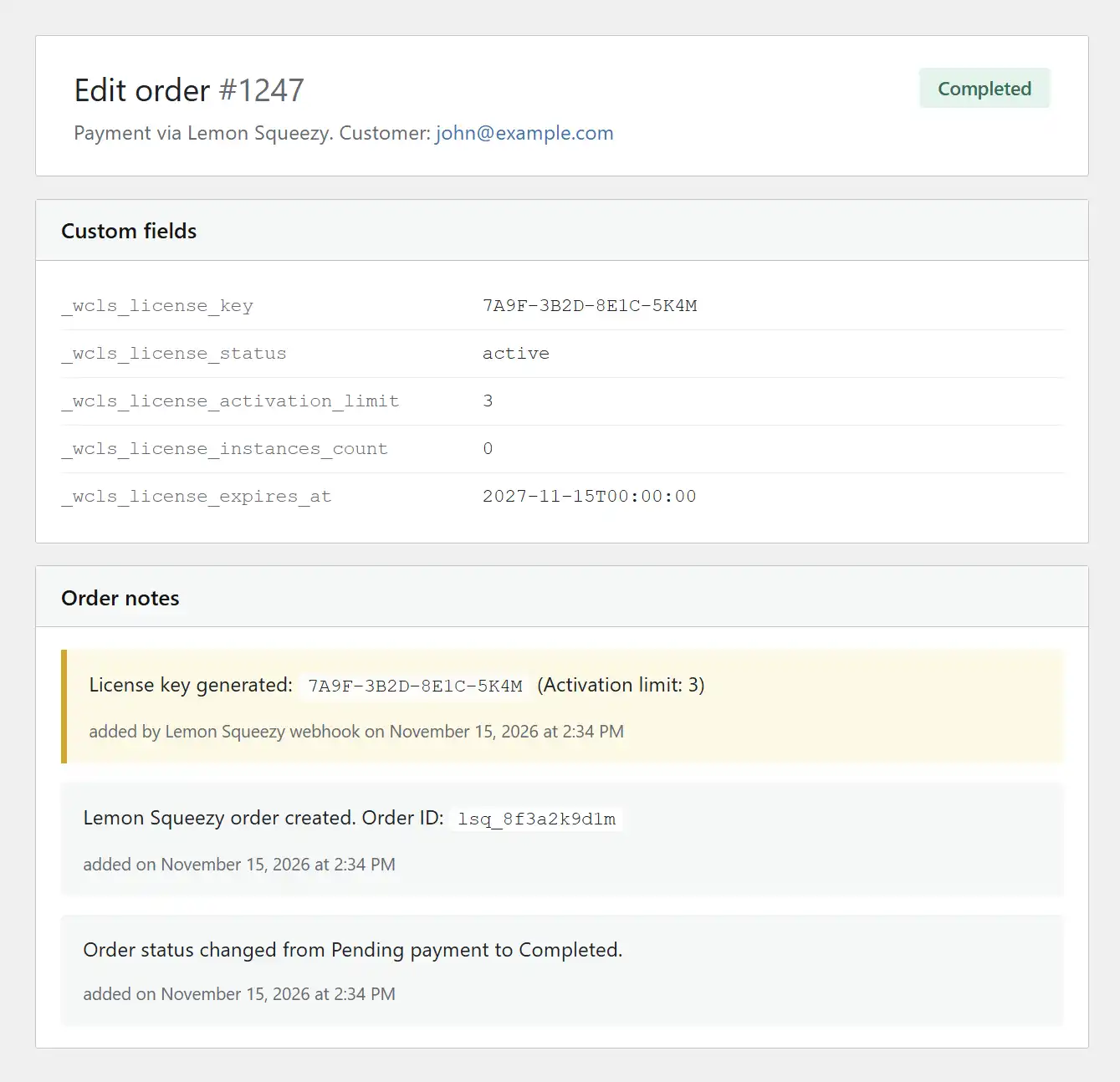
- Test a purchase: buy the product in Test Mode. Check that the order shows the license key on both the thank you page and email. Inside WooCommerce admin, the order detail page also shows the license key, status, and activation limit.
Then add the Lemon Squeezy License API calls to your software’s activation flow. Full API reference on Lemon Squeezy’s site.
Software license management: cost comparison
Rough costs for selling a $49 plugin:
| Approach | Setup cost | Per sale cost | Your ongoing work |
|---|---|---|---|
| Build your own license server | 2 to 4 weeks dev time | $0 | High (maintain infrastructure) |
| WP license plugin (e.g. SLM, EDD Software Licensing) | $0 to $199 | $0 | Medium (maintain WP + security) |
| Lemon Squeezy + DevTonic plugin | $39 plugin + free LS signup | 5% + $0.50 LS fee | Low (nothing to maintain) |
| Enterprise license management (Cleverbridge, etc.) | $1000+ setup | 8% to 12% | Low |
For solo sellers and small teams, Lemon Squeezy + the DevTonic plugin is the lowest-effort option with the fastest setup. You are effectively outsourcing the license server to someone whose entire job is to run license servers.
Frequently Asked Questions
What is software license management?
Software license management is the system of generating, delivering, validating, and managing license keys for software products. It covers how customers get a key when they buy, how your software verifies the key is valid, how you limit the number of activations per key, and how you handle expiry, renewals, and revocations.
How do I sell software licenses on WordPress?
The cleanest way is to use a managed license service like Lemon Squeezy for the license server, plus a WooCommerce payment gateway plugin that surfaces the license key inside your WordPress storefront. The customer pays through WooCommerce, Lemon Squeezy generates the key, the plugin displays it on the order and email, and your software calls Lemon Squeezy’s License API to validate.
Can I use Lemon Squeezy for license keys?
Yes. Lemon Squeezy has a built-in license key feature for any product you sell. You enable it in the product settings, set an activation limit, and Lemon Squeezy generates a unique key per sale. Their License API lets your software validate keys.
Do I need a license server on my WordPress site?
No, if you use Lemon Squeezy. Lemon Squeezy runs the license server on their infrastructure. Your WordPress site is just the storefront. This is better than running a license server on your WP site because it means your licenses stay working even if your WordPress site is down for maintenance.
What WordPress plugins manage software licenses?
Main options: Software License Manager (free, basic, license lives in your WP database), Easy Digital Downloads Software Licensing (paid, integrated with EDD), and the Lemon Squeezy for WooCommerce plugin (integrates Lemon Squeezy’s license server into WooCommerce, license lives on Lemon Squeezy). Each has different tradeoffs around where the license data lives and how much infrastructure you own.
How do I limit the number of activations per license?
With Lemon Squeezy, you set the activation limit when you create the product (e.g. 1 site, 3 sites, unlimited). Lemon Squeezy enforces the limit automatically when your software calls their License API to activate a key.
How do I handle license expiry for yearly subscriptions?
Lemon Squeezy handles this automatically. When a customer’s subscription renews, the license stays active. When they cancel or fail to pay, the license expires on the end date. Your software queries the License API and gets back an expiry status. No code needed on your side beyond the API call.
Can I revoke a license if someone refunds?
Yes. When a refund happens in Lemon Squeezy, the license is automatically disabled. Your software will get a “disabled” status when it next queries the API. The customer can no longer activate or use the software.
Wrap-up
Selling software licenses from WordPress does not have to be complicated. The old way (build your own license server or run everything inside WordPress) adds weeks of work and ongoing maintenance. The clean way in 2026 is to offload license management to a dedicated service like Lemon Squeezy and use a small WooCommerce plugin to surface keys inside your storefront.
To set it up:
- Enable licenses on your Lemon Squeezy product
- Install the Lemon Squeezy for WooCommerce plugin from DevTonic Studios
- Link your WooCommerce product to the Lemon Squeezy variant
- Add Lemon Squeezy’s License API calls to your software
The plugin starts at $39 yearly or $79 lifetime. Lemon Squeezy takes 5% + $0.50 per sale. For most solo software sellers on WordPress, this is the lowest-cost and lowest-maintenance path to a real license management system.
For the full WordPress setup, see the Lemon Squeezy WordPress plugin setup guide. For questions about pricing or scaling, email support@devtonicstudios.com.
Lemon Squeezy for WooCommerce drops each Lemon Squeezy license key straight onto the WooCommerce order and the confirmation email, with no code and a 14-day money-back guarantee.