Advanced Product Fields is one of the best-liked options plugins on WordPress.org: 50,000+ active installs and a 4.8 star rating. If you are searching for an Advanced Product Fields for WooCommerce alternative anyway, it is usually for one specific reason: your product’s price is not “the base price plus some extras”. It IS the calculation. A floor that must be priced by the room size, with waste, in whole boxes. A hire priced by the night. A print run priced from a size-by-quantity grid.
I will be upfront, one developer talking about another: Advanced Product Fields is a good plugin, and their premium can even do formula pricing. So this is not a “their plugin is bad” article; it would not be true. It is about a real difference in shape: APF is a fields plugin that learned pricing. Mine is a calculator that learned fields. Which one you want depends on which job is bigger in your store. I read APF’s own pages on 14 July 2026 for everything below, links included, so you can check me.
In short: Advanced Product Fields is options-first: a lovely ACF-style builder for product fields, with pricing attached to options ($69 a year Pro, or $189 lifetime). PriceWise is calculator-first: the whole price comes from a formula or a measurement, with waste, box rounding, minimum charges, price tables, and hire dates built in ($49 a year, or $99 lifetime). Options-heavy store: APF. Calculation-heavy store: PriceWise.
What Advanced Product Fields does well
Credit first, from their own pages:
- A clean field builder that works like Advanced Custom Fields, with 10 field types free and conditional logic included.
- Premium adds swatches, file upload, dates, repeatable fields, child products, and several pricing modes including formulas.
- Deep integrations: WooCommerce Subscriptions, WPML and Polylang, multi-currency, and page builders like Elementor and Divi.
- The numbers back them up: 50,000+ installs, 4.8 out of 5 on WordPress.org, and their recent support threads show quick answers.
Their own page also lists the free version’s limits plainly, which I respect: the free pricing is a flat fee only, it does not work with themes that use an ajax add-to-cart button, and fields cannot be attached to separate variations. The premium fixes those, at $69 a year or $189 lifetime for one site (their pricing page, 14 July 2026; bigger bundles go up from there). The free version is on WordPress.org.
So where is the line? Options-first vs calculator-first
Both plugins can put fields on a product and change the price. The difference is what each one treats as the main job.
APF starts from fields. You build options, and pricing is something an option can do. That shape is perfect for configurable products: a pizza builder, engraving choices, gift options, add-on services.
PriceWise starts from the price. The whole point is that the total is calculated, and everything else serves that. So the calculator-shaped problems come solved out of the box, instead of being something you assemble from parts:
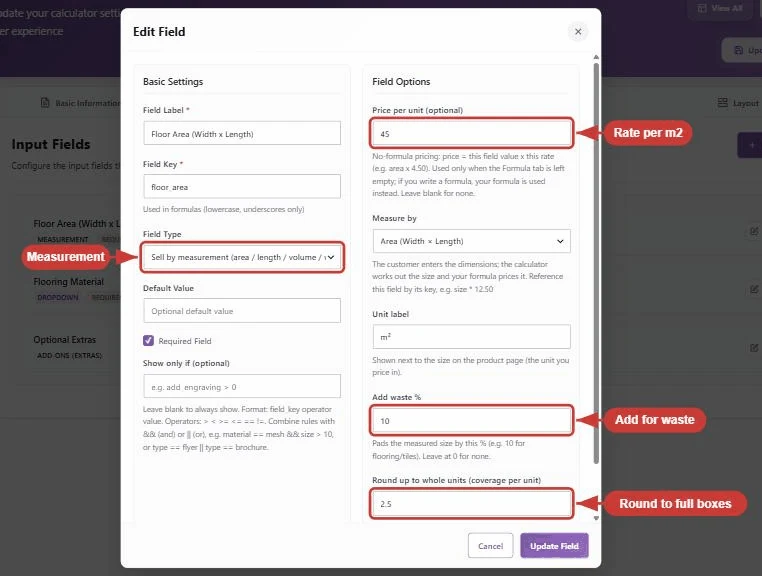
- A real Measurement field. Pick area mode, set your rate per m², add a waste percentage, and round up to whole boxes. One field does the whole flooring job, no formula to write:
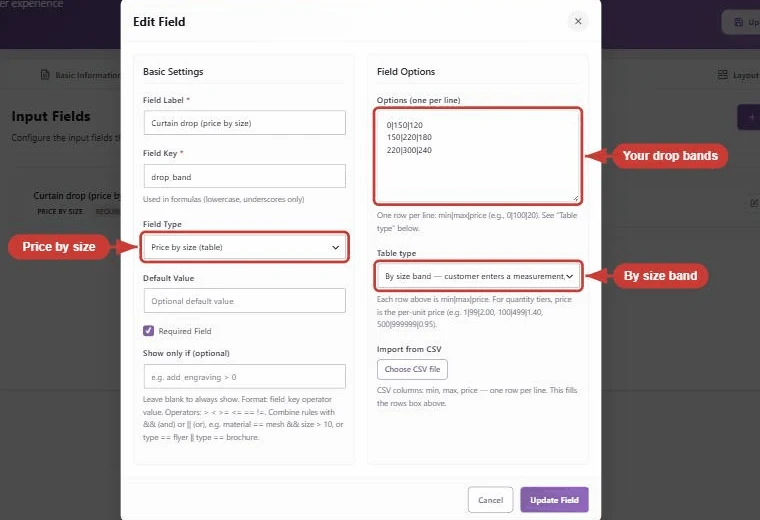
- Price tables. Price by size band, or a size-by-quantity grid, which is how print shops actually quote:
- Hire dates that count themselves. A date range field that turns From and To into nights (or days) and bills per night:

- Trade guardrails as settings. A minimum charge and a setup fee are checkboxes, not formula gymnastics. Plus PDF quotes on orders, and a step-by-step layout for long calculators.
All of that is clickable: the live demos are ordinary products on my own store; what you click is the plugin itself, not a mock-up.
PriceWise vs Advanced Product Fields, side by side
Facts from each plugin’s own pages, checked 14 July 2026, with the PriceWise rows brought up to date for version 2.5 on 27 September 2026. Verify before you buy; both plugins update often.
| PriceWise (mine) | Advanced Product Fields | |
|---|---|---|
| What it is | A price calculator with option fields | An options / fields plugin with pricing modes |
| Free version | Formula calculator, applies to all products | 10 field types, flat-fee pricing only |
| Paid price (1 site) | $49 a year, or $99 lifetime | $69 a year, or $189 lifetime |
| Formula pricing | Yes (free and Pro) | Yes (premium) |
| Measurement field with waste + box rounding | Yes (Pro) | No dedicated field; you build it with calculations |
| Price tables (size bands, size x quantity grid) | Yes (Pro) | No |
| Date range billed per night/day | Yes (Pro) | Date picker, but no night counting |
| PDF quotes on orders | Yes (Pro) | No |
| Repeatable fields | Yes (Pro) | Yes (premium) |
| WPML, Polylang and currency switchers | Yes (Pro) | Yes (premium) |
| Child products, WooCommerce Subscriptions | No | Yes (premium) |
| WordPress.org rating | 5 stars (small sample, new plugin) | 4.8 stars (281 reviews), 50,000+ installs |
Read the child products row again, because that is me being straight with you: APF has child products as options and a WooCommerce Subscriptions integration that I do not have, and their install base dwarfs mine. If your store leans on WooCommerce Subscriptions, APF is probably your answer and you can stop reading here.
Picking between the two
- Configurable products with priced extras (pizza builder, engraving, gift add-ons), or you need WooCommerce Subscriptions or child products as options: Advanced Product Fields. It is a quality plugin and its reviews are earned.
- Products where the price IS the calculation (flooring by area with waste and boxes, cut-to-size, fabric by the metre, hire by the night, print grids, minimum charges, PDF quotes): PriceWise, because those exact jobs are what it ships with, as settings rather than projects.
- On a budget either way: both have free versions. Mine does formula pricing free; APF’s free does options with flat fees. Install both, poke them, keep the one that fits your store. That costs you nothing but an afternoon.
FAQ
Is PriceWise cheaper? Yes, on their own listed prices today: $49 vs $69 a year, and $99 vs $189 for lifetime, one site. But pick by the job first; a plugin that fits badly is expensive at any price.
APF premium has formula pricing. Why would I still switch? If a formula alone covers you, maybe you should not. The switch makes sense when your job needs the calculator plumbing around the formula: waste and box rounding as settings, price tables, night counting, minimum charges, PDF quotes.
Can PriceWise do conditional fields and swatches like APF? Yes, in Pro: show-and-hide rules, colour and image swatches, file upload, and add-ons. The options side is covered; the calculator side is where it goes further. I tested a text box, a priced dropdown and an upload on three themes in how to add custom fields to a WooCommerce product page.
What does APF have that PriceWise does not? Child products as options, and an integration with WooCommerce Subscriptions. If either is on your must-list, stay with APF. Repeatable fields, WPML, Polylang and currency switchers came to PriceWise Pro in version 2.5.
Is there an importer between the two? No. You would rebuild your fields, which for a typical product takes minutes in either direction.
My bottom line
Advanced Product Fields is the best-reviewed plugin in its category, and if your products are options with some pricing, you will be happy with it. But if you keep bending an options plugin to do a calculator’s job, waste, boxes, bands, nights, minimums, that bending never really ends. That job is what PriceWise Calculator Pro was built for: $49 a year, or $99 once. Install the free version and find out whether a formula alone already solves your pricing. If it does, you are finished and it cost you nothing. If it does not, the demos show the parts that do, and the documentation picks up from there.