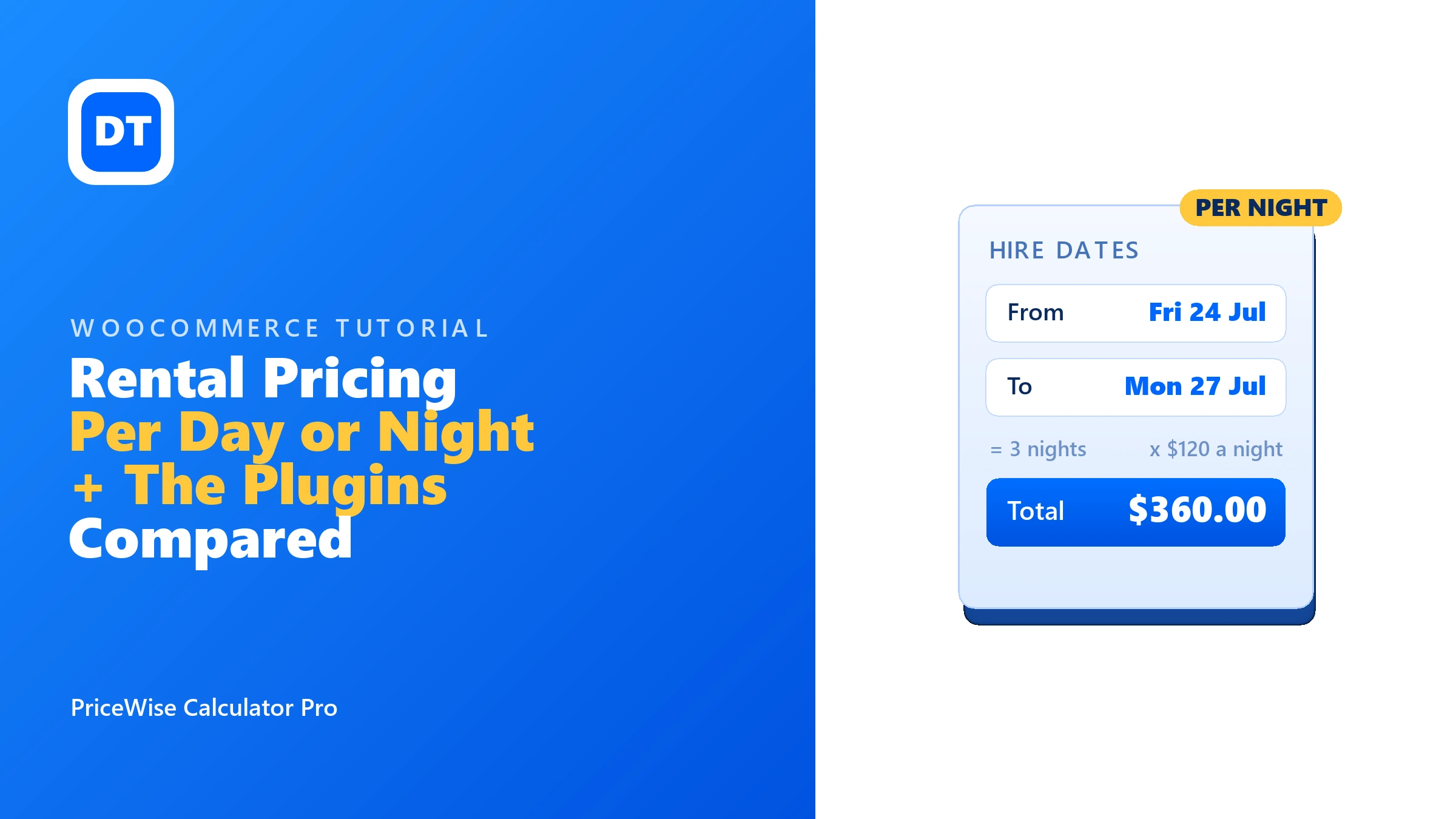
A customer wants your marquee from Friday the 24th to Monday the 27th. That is 3 nights at $120 a night, so $360. Simple maths, but WooCommerce has no idea what a night is. It wants one fixed price, and “contact us for availability” is where most rental sales quietly die.
So you search for a WordPress rental plugin, and you land in a pile of “13 best” lists. I read those lists too. What none of them tell you: most of the plugins on them solve a much bigger problem than the one many hire businesses actually have. In this article I’ll split the two problems apart, show you the lighter option with a live demo you can click, and give you real prices for the full booking plugins (checked this week) in case it turns out you need one.
The gist: If you need an availability calendar that stops double bookings, you need a real booking system, and it costs real money ($249 a year for the official one). If you only need the price to follow the dates, a date field on the product does it: the customer picks From and To, the nights are counted, and the total updates live. That is a 10 minute job with a price calculator, from $49 a year.
Two different problems that get one name
Problem one: bookings. You have one campervan, or three meeting rooms. If two people book the same one for the same weekend, your business breaks. You need an availability calendar, blocked-out dates, and inventory that understands time. That is a booking system, and the good ones are priced like the serious software they are.
Problem two: per-day pricing. You hire out party equipment, tools, dresses, camera gear. You have stock depth (six PA systems, twenty tables), so double booking is not your worry. Your only real problem is the price: 3 nights should cost 3 times the nightly rate, worked out for the customer, on the page. You don’t need a calendar engine for that. You need multiplication.
Almost every list treats problem two as if it were problem one, and sends you to a $249 plugin for a $49 job. Sometimes worse: to monthly software.
The lighter option: a date field that prices per night
This is what I built into PriceWise. You add a Date / booking field to your product’s calculator, set it to Date range, and tell it whether to count nights (to minus from, like a hotel) or days (nights plus one, like tool hire). The customer picks From and To, and the field turns into a number your price can use. The count and the price are worked out again on the server at add-to-cart, so nobody can fiddle the maths in their browser.
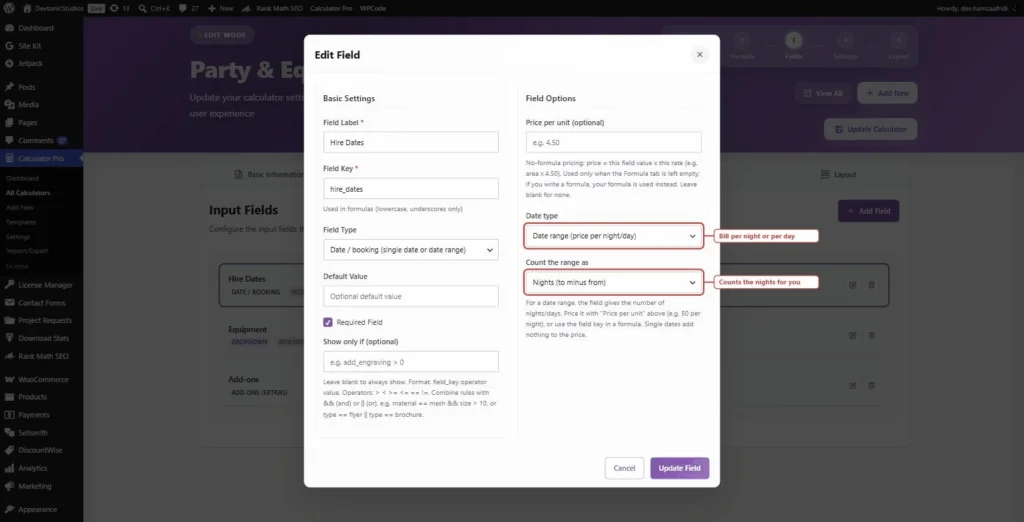
Here is the whole setup for a party hire store:
Step 1: In Calculator Pro > Add New, name the calculator (mine is “Party & Equipment Hire”) and assign it to your hire products.
Step 2: Add a Date / booking field, set it to Date range, counted as nights. Field key: hire_dates.
Step 3: Add a dropdown for the equipment, with the nightly rate as each option’s value: Bouncy Castle 80, Marquee 120, PA System 60, LED Dancefloor 150. Field key: item.
Step 4: The formula is one line:
hire_dates * item
Step 5: Set a minimum charge (mine is $80) so a one-night bouncy castle hire never books below what the delivery run costs you. Add optional extras as add-ons: Delivery & Setup $40, a Damage Waiver at 10%, whatever your trade needs.
On the product page, the customer picks their dates and sees the nights counted, live:
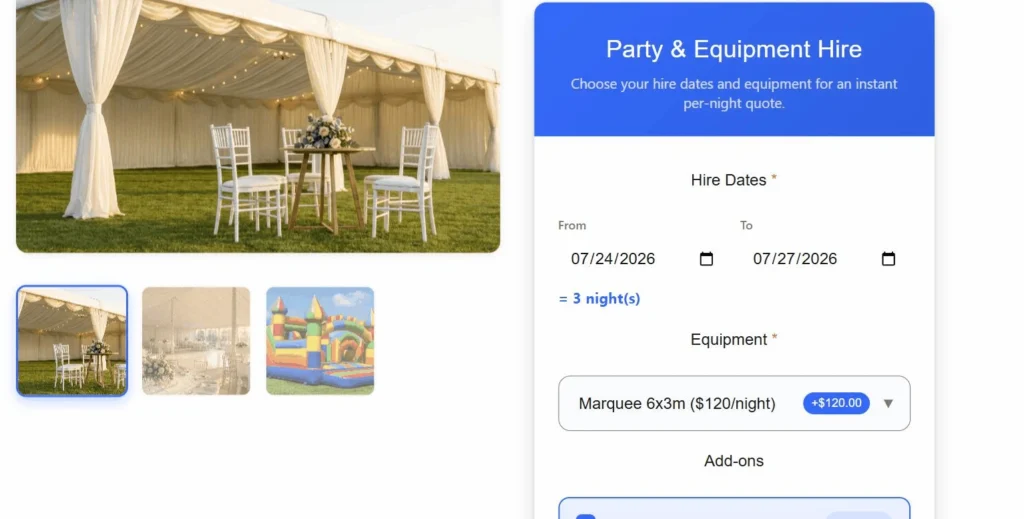
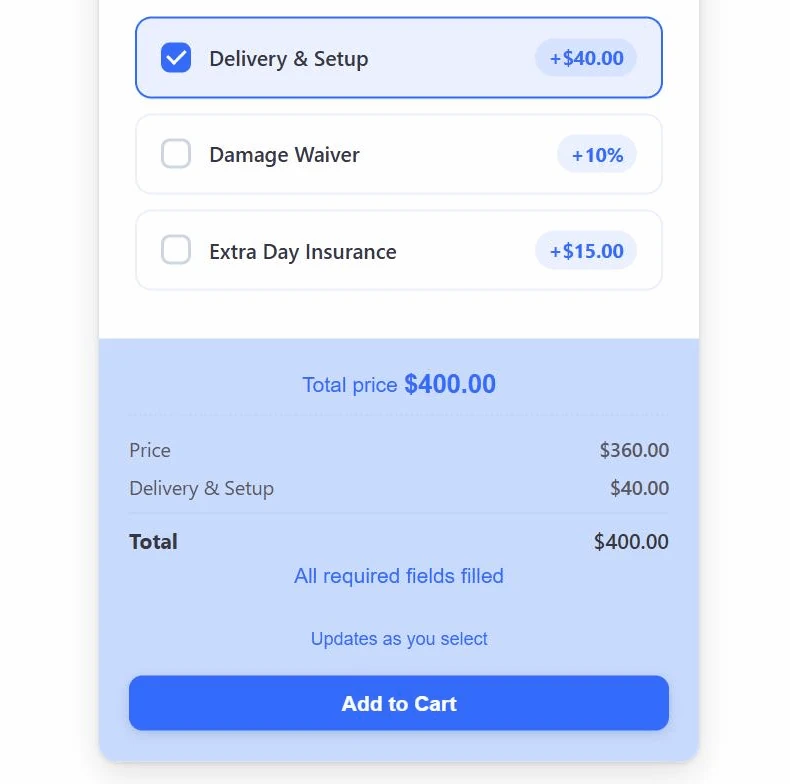
Friday the 24th to Monday the 27th is 3 nights. The marquee is $120 a night, so $360, plus the $40 delivery add-on the customer ticked. The total sits right above Add to Cart, with the breakdown spelled out, and the dates land on the order so you know exactly when to deliver:
That exact store is a live page on my own site, running the same plugin you would install. Try the party hire demo: pick some dates and watch the nights count themselves. There are more live demos here.
The tricks rental stores actually ask for
A weekly rate. Long hires usually get a better nightly price. The formula language has if(), so one line handles it: if(hire_dates >= 7, hire_dates * 100, hire_dates * 120). Seven nights or more drops the rate from $120 to $100.
A damage waiver. Add it as a percent add-on (10% of the total) so it scales with the hire, or a flat add-on if you prefer.
Day pricing instead of nights. Tool hire counts the pickup day. Switch the field to count days and the same range becomes 4 days instead of 3 nights. One setting.
Doing it for $0. The date picker is a Pro field, but the free version of PriceWise can still price per day: add a plain number field (“How many days?”) and the formula days * 80. The customer types 3 instead of picking dates. Less pretty, works fine. I wrote up what the free version covers separately.
Per person pricing
Marquee packages, catering kit and party hire usually get quoted per head, not per item. The customer knows they have 60 guests. They do not know they need 8 trestle tables.
Add a number field called Guests and price off that:
guests * 1860 guests at $18 a head lands on $1,080. If the hire also runs over several nights, multiply both:
guests * hire_dates * 18You can put a minimum on it so a booking for four people is still worth doing:
if(guests < 20, 20 * 18, guests * 18)That charges everyone below 20 guests as if they booked 20.
Hourly hire
Some kit never goes out for a whole day. PA systems, photo booths, function rooms and bouncy castles get booked by the hour.
Swap the date field for a number field called Hours:
hours * 45Most hourly hire has a minimum, because a one hour booking costs you the same delivery run as a five hour one:
if(hours < 3, 3 * 45, hours * 45)Three hour minimum at $45 an hour. Book one hour, you still pay $135.
Seasonal and peak rates
A marquee in June is not the same price as a marquee in February, and every rental owner I have spoken to prices it that way.
Two ways to handle it. The simple one is a dropdown called Season with the rate sitting on each option: Peak 150, Shoulder 120, Off-peak 100. Then multiply:
season * hire_datesThe customer picks their dates, picks the season, and the total moves. It puts the choice in their hands, which some owners like and some do not.
The tighter option is a checkbox called Peak dates that adds a percentage:
if(peak = 1, hire_dates * 120 * 1.4, hire_dates * 120)Peak bookings pay 40% more. One line, no dropdown for the customer to get wrong.
Size options
Nobody hires “a marquee”. They hire a 6m by 12m marquee, or a 3m by 3m gazebo, and the price gap between those is large.
Put the nightly rate on each dropdown option rather than writing a formula for every size:
Marquee 6x12    220
Marquee 6x6     150
Gazebo 3x3       60
Then the formula stays the same whatever they pick:
marquee_size * hire_datesAdd a second dropdown for flooring or lighting and add it on. Each option carries its own number, so adding a new size later is one row in the settings, not a new formula.
Weddings and parties
Wedding hire is where per person pricing, size options and seasonal rates all land on the same order, which is why a plain price field never works for it.
A realistic wedding calculator is four fields: dates, guest count, marquee size, and a set of extras as checkboxes. The formula stacks them:
(marquee_size * hire_dates) + (guests * 18) + extras60 guests, a 6×12 marquee for 3 nights, plus $300 of extras comes out at $1,140 in front of the customer before they submit anything. That is the number they wanted when they landed on your site, and most rental sites make them fill in a form and wait a day for it.
Late return fees
Being straight with you: a calculator cannot charge this. A late fee happens days after the order is paid, and PriceWise prices the basket, it does not chase people afterwards.
What it can do is show the rate up front so nobody is surprised. Add a read-only note next to the date field with your daily late rate, and it gets saved on the order alongside the hire dates. When someone brings the marquee back two days late, you have the dates, the rate, and a paper trail, and you raise the charge in WooCommerce as a separate order.
If you need automatic late billing with card details held on file, you want a full booking system, not a calculator. I would rather tell you that now than after you have paid.
One calculator, three looks
Everything above shows the all-in-one layout: the whole calculator in one card. That is one of three display styles, and you switch between them with a single dropdown on the calculator’s Layout tab. No code, no shortcodes:
- Step-by-step: one question at a time, with a progress bar and Prev / Next buttons. For a longer calculator (dates, equipment, extras) it stops the form looking like homework.
- All-in-one: every field together in one card. That is what the screenshots above show.
- Inline: no box at all. The fields sit on the page as if your theme built them.
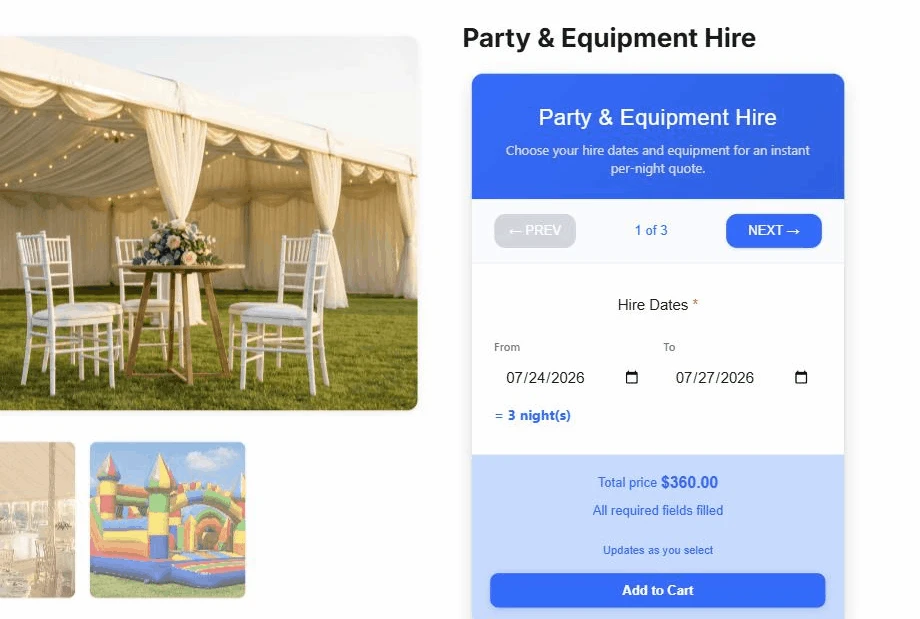
Same party hire calculator, switched to step-by-step. Nothing else changed: same fields, same 3 nights, same total. One setting.
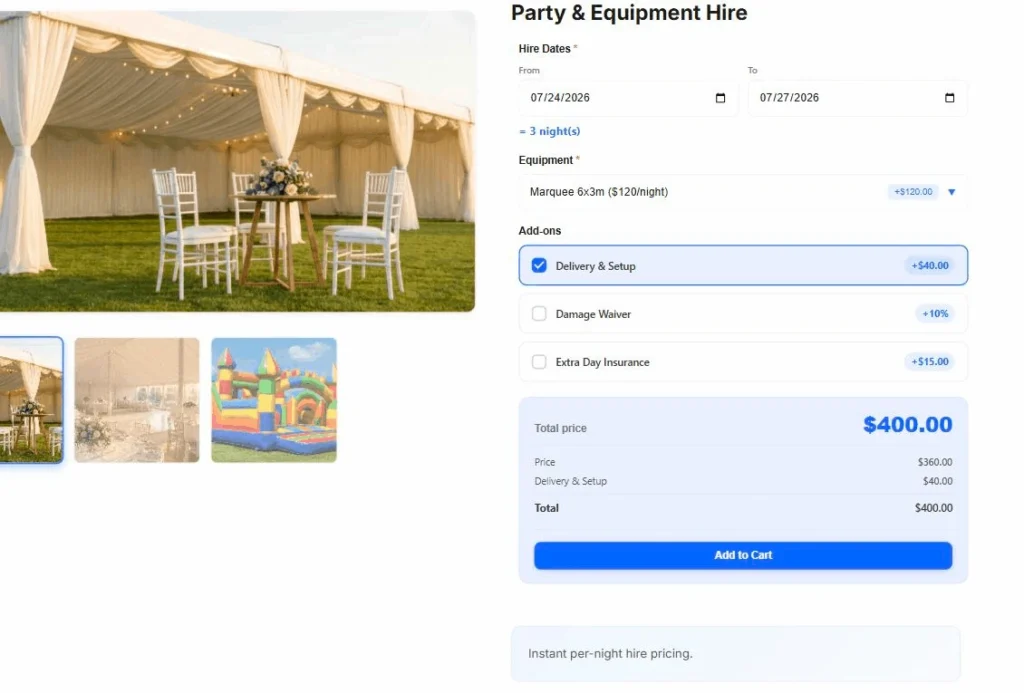
And the same calculator again in inline: the box is gone, the fields sit on the page as if the theme built them, and the total still lands on $400.
Where the lighter option stops (read this before you pick it)
PriceWise is not a booking system, and I won’t dress that up. There is no availability calendar. It will not stop two customers hiring your only marquee for the same weekend. If you have one of something and clashes would ruin your week, buy WooCommerce Bookings and sleep well.
But if you have five marquees and twenty tables, normal WooCommerce stock already limits how many can be sold, and what you were actually missing was the per-night price on the page. That is the case the $249 plugins are overkill for, and it is the case this was built for.
The WordPress rental plugins, with real prices
I checked every price on 14 July 2026 on each plugin’s own page. Single site, before tax. They change, so check again, and read the reviews on their pages, before you buy.
| Plugin | Price today | What it really is |
|---|---|---|
| WooCommerce Bookings (official) | $249 a year | Full booking engine: availability, time slots, resources |
| Booqable | From $29 a month, billed yearly | Rental software (subscription) with real-time availability and inventory; embeds on WordPress |
| VikRentItems | Free version, Pro 109 € | Its own WordPress rental system (own calendars, cart, payments); one-time fee |
| PriceWise (mine) | Pro $49 a year, or $99 once; free version for formula pricing | A price calculator with a date range field: per-night or per-day pricing on normal WooCommerce products |
There are also one-time-license rental plugins on marketplaces like CodeCanyon (RnB is the known one). I won’t quote a price because those listings change often; if you go that route, read the recent reviews first and check what support actually costs after six months.
Fair notes, because every one of these earns its place somewhere. WooCommerce Bookings is the right answer when double bookings would hurt you; it plugs into normal WooCommerce orders and it is built for exactly that. Booqable is full operations software if rentals ARE your business and you want stock, contracts, and payments managed in one place; you are paying for a subscription system, not a one-off plugin. VikRentItems gives you a complete rental workflow on WordPress with no subscription (a one-time fee, and a free version to start); it is its own system with its own calendars, cart and payments, not a WooCommerce add-on, so it sits beside WooCommerce rather than inside it. You can check all of this on their own pages: WooCommerce Bookings, Booqable, and VikRentItems.
Which WordPress rental plugin should you pick
- One-of-a-kind items where a clash is a disaster (one van, one venue, one photographer): WooCommerce Bookings, $249 a year, the tool built for exactly that.
- Rentals are your whole business and you want inventory, documents, and payments in one system: Booqable, from $29 a month.
- You want a self-hosted rental workflow and don’t mind it living beside WooCommerce: VikRentItems, free to start.
- You have stock depth and just need the price to follow the dates: a date field on the product. That is the lighter option below.
FAQ
Does the customer see the number of nights before they pay? Yes. The field shows “= 3 night(s)” the moment both dates are in, and the total updates with it. The dates and the count are saved on the order too.
Can I charge different rates for different items? Yes. Put the nightly rate on each dropdown option (Marquee 120, PA 60) and multiply: hire_dates * item.
Can a customer pick a To date before the From date? A backwards or missing range counts as zero nights, so nothing gets priced from nonsense dates. The maths is re-checked on the server at add-to-cart.
Does it block out dates that are already taken? No. That is booking-system territory (see the honest section above). This prices the dates; it does not manage a calendar.
Can I take a deposit instead of the full amount? Not with the calculator alone. A deposit add-on for WooCommerce can sit on top, but out of the box the customer pays the calculated total.
Last thing
- Ask the only question that matters: would a double booking hurt me? Yes: buy a real booking system. No: you just need per-day pricing.
- Per-day pricing = a Date range field, a rate, and
hire_dates * item. Ten minutes, honestly. - Add the minimum charge and the damage waiver before you launch, not after the first painful order.
The date field, add-ons, and minimum charge are all in PriceWise Pro ($49 a year, or $99 once). Start with the party hire demo or the free version, and the documentation covers the details. Either way, put the price on the page. “Contact us for availability” is costing you hires every week.