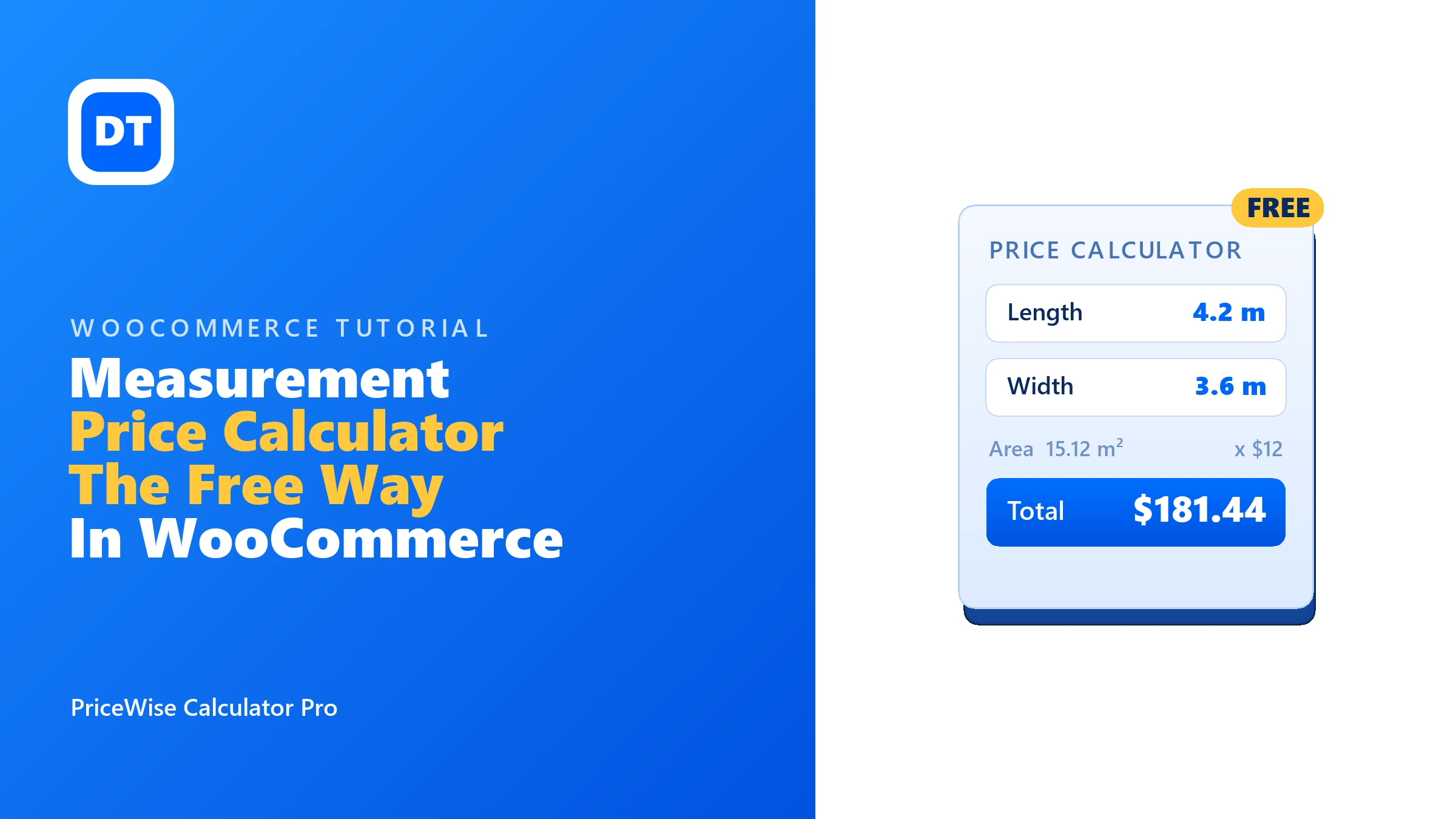
You sell vinyl flooring at $12 a square metre. A customer’s hallway is 4.2 by 3.6 metres. Right now, there is no way for them to buy that in your shop. WooCommerce wants one fixed price, and their price is $181.44.
So you searched for a WooCommerce measurement price calculator, and the first results want $149 a year. Every year. Before you pay that, read this. Making WooCommerce plugins is my whole job (a one-person job), and one of mine does measurement pricing free. So: what the free way covers, where it stops, and what every paid option really costs, with prices I checked this week.
Quick answer: The free PriceWise plugin puts a price calculator on your product pages. The customer types their measurements, a formula you write once (like
length * width * 12) works out the price live, and the price goes into the cart with their numbers saved. That’s free. PriceWise Pro ($49 a year) adds real measurement units, waste, box rounding, and price tables. The official WooCommerce extension is $149 a year.
What a measurement price calculator does
Some products don’t have one price. Flooring is sold by the square metre. Fabric by the metre. Topsoil by the tonne. Glass by its exact size. Without a calculator, the customer has to email you for a quote, and not all of them will.
A measurement price calculator fixes that. The customer types their sizes on the product page and the price works itself out, live. Take that hallway: the customer types 4.2 and 3.6. That’s 15.12 m², times $12, so $181.44 shows on the page before they add to cart. You see their exact numbers on the order. No emails, no quote, no waiting.
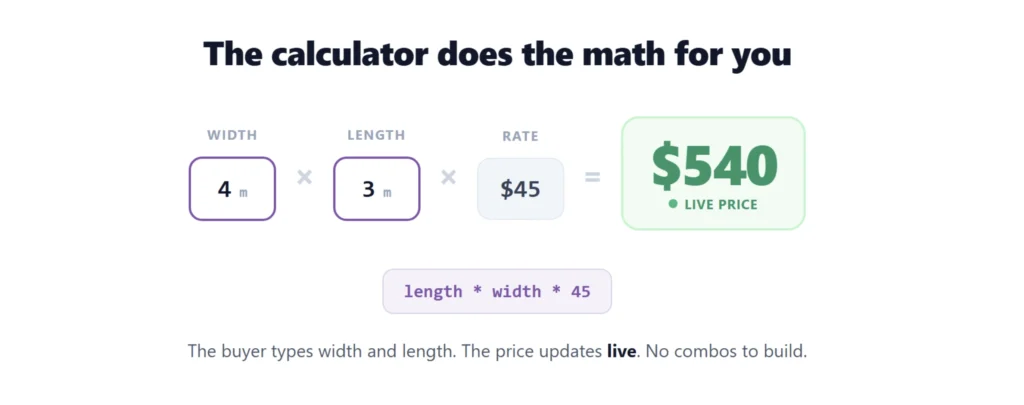
The free WooCommerce measurement price calculator
The plugin is called PriceWise and the free version is on WordPress.org. No trial, no card, no locked buttons. Here is exactly what the free version does:
- Number fields. Ask the customer for length, width, weight, quantity, guests, any number.
- One formula, written once. Use your field names with + – * / ( ) and the functions round, ceil, floor, min, max, abs, and if.
- A live price. The total updates as the customer types. No reload, no button.
- A price that can’t be faked. The final price is worked out again on your server at add-to-cart, so nobody can edit it in the browser.
- Into the cart and the order. The price and the customer’s numbers are saved on the cart line, the checkout, and the order.
- Your currency, your words. The price follows your WooCommerce currency settings, and you can change every label the customer sees.
Two honest limits. In the free version, one calculator applies to all your products, so it fits stores where one pricing rule covers everything you sell. And you write the formula yourself. There is no ready-made unit dropdown in free; that is a Pro field. If you can type length * width * 12, you’re fine.
Set it up in five minutes
Step 1: Install it. In your WordPress admin, go to Plugins > Add New, search for “PriceWise”, install and activate it.
Step 2: Make a calculator. Go to PriceWise > Add New and give it a name, like “Flooring price”.
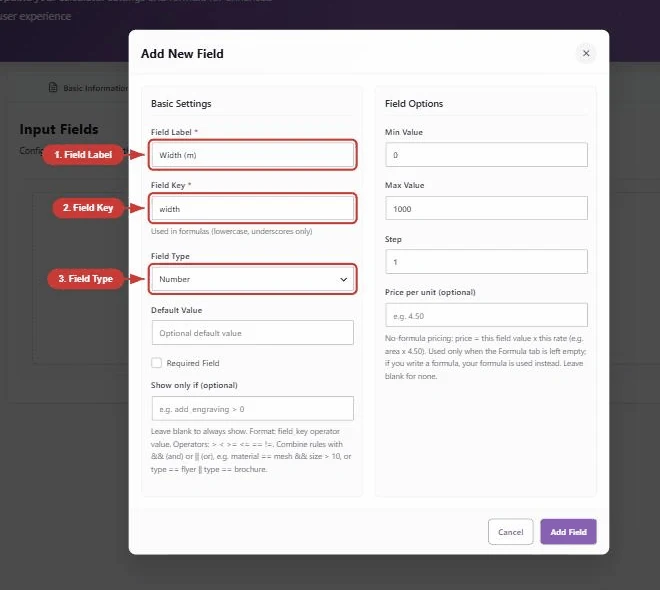
Step 3: Add your number fields. Save it, then on the Input Fields tab add a Number field called “Length in metres” (field name length) and another called “Width in metres” (field name width).
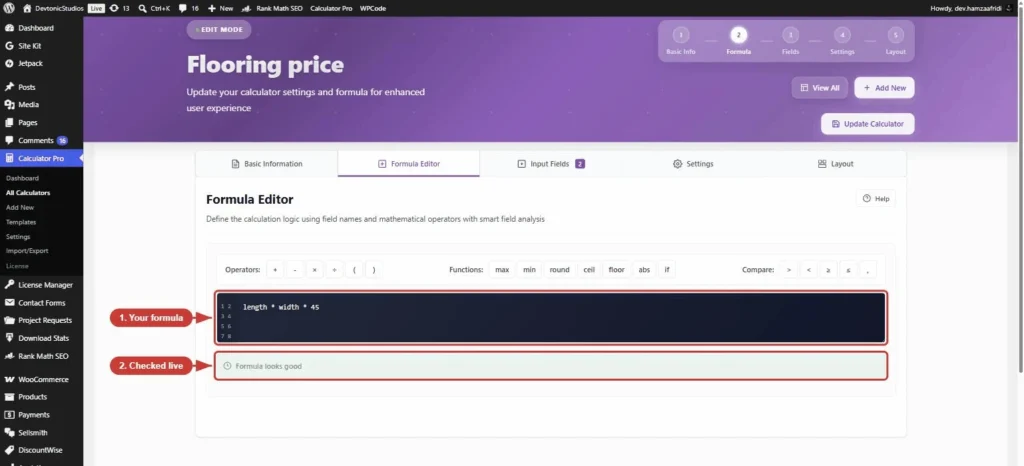
Step 4: Write the formula. On the Formula Editor tab, type your rule. For $12 per square metre:
length * width * 12
Step 5: Save and test. Open a product (it needs a regular price set, or the calculator won’t show). Type 4.2 and 3.6. You should see $181.44 update live.
Want a minimum charge so small cuts don’t cost you money? Wrap the formula in max:
max(length * width * 12, 40)
That charges by area but never less than $40. The same trick works for weight (kilos * 4.5), volume (length * width * depth * 30), or per person (guests * 18), or per day for hire items (here is the full rental pricing guide). If you can say the rule out loud, you can type it. My guides on selling by the square meter, selling by volume, and cut-to-size pricing walk through full setups for those trades.
Want to try one before you install anything? Play with the live demos. They are real products on my own store, running the same plugin you would install. Type some sizes and watch the price move.
How it looks on the page (two layouts in free)
The free version ships two display styles, switched with one dropdown. All-in-one puts the whole calculator in a card, which is what the screenshots above show. Inline drops the box completely, so the fields sit on the page as if your theme built them:

That is my flooring demo in the inline layout. (The width-by-length field in the picture is a Pro measurement field, but the layout switch itself is in free.) Pro adds a third style on top: step-by-step, which asks one question at a time with a progress bar. Long calculators feel much shorter that way. Here it is on the same flooring product:

Same fields, same $675, just served one question at a time with Prev and Next.
What the paid plugins cost right now
Here is the honest picture. I checked every price and rating on 14 July 2026, single site, before tax. Prices and ratings both change, so click through to each plugin’s own page and check before you buy.
| Plugin | Free version | Paid price (1 site) | Stands out for |
|---|---|---|---|
| PriceWise (mine) | Yes, on WordPress.org | Pro is $49 a year, or $99 once for lifetime | Formula pricing free; units, waste and box rounding in Pro |
| Measurement Price Calculator (official extension, by SkyVerge) | No | $149 a year | Stock and shipping weight tracked per unit |
| WooCommerce Product Options (Barn2) | No | $149 a year | A full product options plugin with a calculator inside |
| Flexible Quantity (wpdesk) | Yes, on WordPress.org | Pro is $79 a year | Units of measure (weight, length, area, volume), also on variations |
To be fair to the others, this is where each one earns its money. The official extension tracks inventory per unit, so if you sell fabric by the metre it can count your stock in metres, and it can set a shipping weight per unit too. If you need that, it earns its price. Its own marketplace page shows a mixed rating (3.7 stars from 45 reviews on 14 July 2026), so read those before you buy. Barn2 calls its plugin a product options plugin, with a measurement calculator built in, so if you also want swatches and add-on fields from the same plugin it makes sense. And wpdesk’s free version has more installs than mine today (2,000+ against my 10+). You can check all of it on their own pages: the official extension, Barn2 Product Options, and wpdesk Flexible Quantity.
PriceWise is the newest of the four. I say that openly. What you get from that: it was built on current WooCommerce, one person answers the support emails (me), and the free version isn’t a teaser. It’s the whole formula calculator.
Which one should you pick
- You need measurement pricing and want to spend nothing: install the free PriceWise and write your formula. wpdesk’s free plugin is worth a look too. Try both, keep the one that fits.
- You want unit pickers, waste, box rounding, price tables, or different calculators per product: PriceWise Pro at $49 a year, or $99 once.
- You need stock counted per metre or per square foot: the official $149 extension is the one that does that properly.
- You want a big options plugin (swatches, add-ons, extra fields) that also calculates: Barn2 at $149 a year.
When free stops being enough
The free formula covers a lot. But some jobs kept coming up in support emails, so I built proper fields for them in Pro:
- A real Measurement field. Pick a unit (m², sq ft, metres, kilos, litres) instead of writing the formula. It has a waste percentage and round-up to whole boxes built in. Fitters order 10% extra for offcuts; flooring sells in 2.5 m² boxes. One field handles both.
- Different calculators for different products. Free applies one calculator to everything. Pro assigns them per product or per category.
- Price tables. Price by size band, or a size-by-quantity grid, the classic print shop table.
- More field types. Dropdowns, checkboxes, file upload, dates, add-ons, swatches.
- PDF quotes. A branded PDF of the configured order, attached to the order email.

Pro is $49 a year, or $99 once if you’d rather never pay again. Both cost less than one year of the $149 options.
FAQ
Is the free version really free? Yes. It’s on WordPress.org, which means it has to work on its own. No trial period, no card, no “upgrade to save” button blocking the cart. Pro exists, but free does the whole formula job without it.
Can a customer change the price in the browser? No. The live price on the page is for showing. At add-to-cart, your server runs the formula again with the customer’s numbers and uses that result. Editing the page changes nothing.
Can it price by weight or volume, not just size? Yes. The formula doesn’t care what the number means. kilos * 4.5 prices topsoil, length * width * depth * 30 prices by volume, guests * 18 prices catering.
Why is the official extension $149 when free plugins exist? It does some deeper store plumbing, mainly inventory and shipping weight tracked per unit. Some stores truly need that. If you just need the price worked out from measurements, you don’t.
Will it clash with my theme? It uses the standard WooCommerce product page hooks, and there’s an inline layout that drops the card styling so it blends into the page. If something looks off, the colours and labels are all adjustable.
Before you go
The short version:
- Say your pricing rule out loud. If it’s “this times that”, the free plugin can price it.
- Install free, add number fields, write the formula, put a regular price on the product, test it.
- Only pay when you need a real reason to: units and waste, per-product calculators, tables, or per-unit stock.
For the wider picture, see my complete guide to WooCommerce price calculators. Start with the free version on WordPress.org or try the live demos first. If you outgrow it, the WooCommerce price calculator plugin page shows everything Pro adds, and the documentation has the details. Either way, the price belongs on the page, not in your inbox.