Banner PrintingPick a size and quantity, then the finishing
Size & quantity*
A1 (594×841mm)
5
= $125.00
Material
Premium mesh+$15.00
Finishing
Hemmed + eyelets+$8.00
Pole pockets+$12.00
Upload your artwork
Total price$148.00
Price$140.00
Hemmed + eyelets$8.00
Add to cart
Brightline PrintCart
PVC and mesh banners
Banner PrintingPick a size and quantity, then the finishing
Size & quantity*
A1 (594×841mm)
5
= $125.00
Material
Premium mesh+$15.00
Finishing
Hemmed + eyelets+$8.00
Pole pockets+$12.00
Upload your artwork
Total price$148.00
Price$140.00
Hemmed + eyelets$8.00
Add to cart
A banner shop page with PriceWise on a laptop and on a phone: A1, 5 banners, premium mesh, hemmed with eyelets, total $148.00.
THE REALITY CHECK
Your Competitors Use WooCommerce Product Calculators. You Don't.
While you're sending manual quotes, other stores are using price calculators to close sales 24/7. Here's what you're losing every single day...
They Get Instant Sales, You Get "I'll Think About It"
Customer searches "custom t-shirts." Visits 5 sites, including yours. Four have calculators. You have "Contact for Quote." They buy elsewhere in 5 minutes.
The result:They buy where the price shows
They Sell While You Sleep
11pm Sunday. Customer needs 200 flyers by Wednesday. The competitor has a calculator, so instant quote, instant order. You have an email form. By Monday, job is done and paid for.
The result:The 11pm order goes elsewhere
You're Chained to Your Desk
Your competitor took a 2-week vacation. Their store kept selling via calculators. You? Can't leave for a day without sales dying. They built a business that runs without them.
Your Reality:Built a job, not a business
THE SOLUTION
How PriceWise solves all three problems
Other plugins have calculators too, but most are plain form fields that customers just put up with. PriceWise gives them one they are happy to use. Here is what makes the difference.
Customers get a price right away
No more "contact us for a quote". The customer picks their options, sees the price, and can order on the spot, instead of leaving to buy from someone who shows it.
It takes orders while you sleep
The calculator quotes and takes orders at any hour. Someone who needs something at 11pm on a Sunday can order it then, not wait for you to reply on Monday.
It keeps selling without you
Because the calculator does the quoting, your store keeps selling whether you are at your desk or away. You stop being the bottleneck.
Want to see everything it can do? Here is the full list.
Thirteen trades, each priced by a real PriceWise calculator. Pick whichever is closest
to what you sell and see how its total is built as the options go in.
Signs and banners
Size grid, then paid finishing
A size down one axis, a quantity across the other, and the price comes out of the cell. Material and finishing stack on top, each its own line.
3m x 1m, run of 5£248.00
440gsm blockout+£14.00
Pole pockets+£12.00
Reinforced corners+£6.00
Total on screen£280.00
Large format print
Priced off a size and quantity table
Pick the size and the run, add the material and the finishing. No quoting by hand and no waiting for a reply.
Size and quantityfrom the table
Materialpriced option
Finishingpriced options
Total on screen$140.00
Glass cutting
Priced by the measurement
Size and thickness set the base price. Every hole, cutout and edge finish adds a line of its own, and a sketch can come with the order.
900 x 600mm, two off£112.00
Socket cutout+£9.00
Drilled hole+£4.00
Total on screen£125.00
Worktops and surfaces
Area, material and edge profile
Worked out from the measurements the customer types in, with the material rate and the edge work added on automatically.
Area and materialfrom the sum
Edge profilepriced option
Extraspriced options
Total on screen$2,515.00
Joinery and panels
Cut to size, banded and machined
Size and thickness off the grid, banding and machining on top, and the whole cutting list can be uploaded instead of typed out.
1200 x 600mm, 12mm£12.50
Oak banding, one edge+£4.00
Drilled hole+£2.00
Socket cutout+£8.00
Total on screen£26.50
Covers and tarpaulins
Minimum charge, applied automatically
Material weight and finishing move the price, and when the total lands under your minimum the plugin adds the difference as its own visible line.
Base price£9.00
Reinforced corners+£8.00
Minimum charge£28.00
Total on screen£45.00
Apparel and garment print
Ten questions, one at a time
Quantity bands, garment quality, print locations, a colour slider, artwork upload and colour swatches, asked one step at a time with the price running underneath.
Steps10
Field types on show7
Quantity50 shirts
Total on screen$375.00
Cards and stationery
Business cards and small print orders, priced in seconds
Stock, finish and quantity, each carrying its own price, so a fifty pound job does not need an email thread.
Stock and finishpriced options
Quantityfrom the table
Total on screen$40.00
Flooring and tiling
Priced by the square metre
The customer puts in the room, picks the material, and the waste margin and fitting are added on top for you.
Areatyped in
Materialpriced option
Fitting and wasteadded on
Total on screen$2,750.00
Hire and rental
Priced by the day, from two dates
Pick the dates, pick the kit, add delivery and the waiver. The nights are counted and multiplied for you.
Hire dates2 nights
EquipmentMarquee 6x3m
Add-onspriced options
Total on screen$240.00
Photography and events
A package, then the extras
Coverage hours, second shooter, album and travel, all adding up in front of the customer instead of in a quote you have to write.
Packagepriced option
Hourstyped in
Extraspriced options
Total on screen$1,275.00
Cleaning and home services
Priced by rooms and job type
Bedrooms, bathrooms, the type of clean and the extras. A minimum charge keeps the small jobs worth doing.
Roomsfrom the sliders
Job typepriced option
Minimum charge$25.00
Total on screen$90.00
Installers and trades
Solar and install work, priced on the page
Roof area, panel quality, battery and how awkward the install is. Fourteen thousand pounds worth of work quoted without a site visit.
Roof area2,875 sq ft
Panel qualitypriced option
Batterypriced option
Total on screen$14,375.00
Not on the list? If your price is a sum of size, options, quantity or
time, it is the same handful of fields underneath. Picture framing, fencing and decking, curtains
and blinds, catering, upholstery, skip hire and packaging all work the same way.
Top Features
What the plugin actually does for your store
Any product
Customers pick their options and see the price right away
Whatever you sell, the customer chooses things like size, quantity and extras, and the total updates in front of them. They get a price without emailing you and waiting for a reply. It works the same way for printed shirts, cut-to-size glass, made-to-measure furniture or event catering.
The total updates the moment they change an option
Customers get a price without waiting for you to reply
You build the form by clicking, with no code
Riverside Tees, your customer's screen
SMLXL
Front print+$2 each
Back print+$2 each
25hoodies
Their price$500.00
Conditional logic
Questions only appear when they actually apply
You don't have to put every option on one long form. When a customer picks something that needs a follow-up, like choosing engraving, the box to type the engraving message shows up on its own. If they don't pick it, they never see it, so the form stays short. This is the feature usually called conditional logic, or if/else rules, and you set it up by clicking.
Customers only see the questions that apply to them
A shorter form means fewer people give up partway
You decide which choice reveals which field
Gemma's Gifts, your customer's screen
Add laser engraving?
NoYes
appears only when they say yes
Happy 25th Anniversary ✦
Secure pricing
Your store works out the price again before charging
Before an order goes through, your store works out the price again on its own, so the customer always pays the amount you set. If someone tries to change the price on the page to pay less, it is ignored. This happens on every order by itself, with nothing for you to switch on.
A customer cannot pay less than the price you set
It checks every order on its own
There is nothing for you to set up
Pennine Joinery, oak worktop order
Customer pays£480.00
Tried to sneak it down to £1, blocked
The price you set is the price you get. Every time.
Any country
It adapts to the country and language your store uses
No matter which country you sell in or what language your customers speak, the plugin fits around it. Prices show the way people expect in that country, like 1.234,50 € in Germany or $1,234.50 in the US, and you can write every label, button and message in your own words. You set this once, and you do not need a separate translation plugin.
Prices show in the format each country expects
You write every label and button in your own language
You do not need a separate translation plugin
The same product, three countries
US$1,234.50Add to cart
DE1.234,50 €In den Warenkorb
FR1 234,50 €Ajouter au panier
Every field type
What your customer can fill in, pick and see.
Fifteen kinds of field, plus colour and picture swatches and an itemised total.
Mix them on one product, and every field that carries a price adds straight into the total.
01
Dropdown
A list of options, each one with its own price.
02
Radio buttons
One choice out of a set, with what it adds shown next to it.
03
Checkboxes
Tick any that apply. Each ticked line shows up in the breakdown.
04
Colour swatches
Real colours to click instead of a list of colour names. Works on radio buttons and checkboxes.
05
Picture swatches
Small pictures to pick from, like a wood finish or a fabric. Works on radio buttons and checkboxes.
06
Add-ons
Paid extras, charged as a flat fee, per unit, per size or as a percentage.
07
Price grid
Size down one side, quantity across the top. The price comes out of the cell.
08
Measurement
Length, width or both, with the size worked out as they type.
09
Price by size
They enter a size and the price comes from the band it falls in.
10
Number
Any count or measure, typed straight in.
11
Slider
Drag it and the price follows. Good for counts and grades.
12
Date and booking
One date or a range, priced per night or per day.
13
Repeat a set of fields
An "Add another" button, so one order can hold five windows of five sizes.
14
Text
A name, a reference or a note that travels with the order.
15
File upload
Artwork, a sketch or a cutting list, attached to the order.
16
Email
Their address, saved with the order so you can reply.
17
Phone
A number to call them back on, saved with the order.
18
Itemised total
Every line spelled out under the total, so nobody argues with the number.
FEATURES
Everything else PriceWise can do
Professional features ready in 10 minutes
Real PDF Quotes
One click turns any order into a clean, branded PDF. You can also have it sent to the customer with the order email.
Sell by Measurement
Charge by area, length, volume or weight. You can add a waste percentage and a minimum charge.
Edit From the Cart
Customers change a configured item right from the cart, with their answers pre-filled. No deleting and starting over.
Works With Variable Products
Choose per calculator: replace the variation price, add to it, or use it in your own formula.
15+ Color Customizations
Control every color: headers, buttons, badges, footer. Match your exact brand.
Text-Based Formula Builder
Write your own sum, like "length * width * rate", with rounding and if-rules when you need them. Or skip sums and set a rate per unit on a field, like 4.50 per square metre.
Flexible Assignment
Put a calculator on one product, a whole category or every product, and choose which one wins when two apply.
Quantity Price Breaks
Set a simple table so the per-unit price drops as the quantity goes up. Type it in or import a CSV.
Import/Export System
Save a calculator to a file and load it on another site. Handy as a backup before updates.
Shipping by Real Size & Weight
The cart line's weight and dimensions can come from the customer's measurements, so shipping for made-to-order items charges correctly.
Point-and-Click Field Builder
Add and arrange your fields through simple forms, by clicking. No code.
Guided Setup & 10 Templates
Answer a few questions and PriceWise builds your calculator for you. Or start from a template: flooring, curtains, printing, banners, apparel, framing and more.
Display options
Three ways to show it on your page
Same calculator, same settings. You just choose how it appears to your customers.
Custom Vinyl Banner
Build your banner and see the price as you go
1 of 6
Size *
📝 We need this to calculate your price
Colour *
📝 We need this to calculate your price
Material *
Standard vinyl$0.00
▼
Standard vinyl$0.00
Premium matte+$15.00
Gloss laminate+$25.00
📝 We need this to calculate your price
Banner size *
×
📝 We need this to calculate your price
Ink coverage
0 %
40
%
100 %
📝 We need this to calculate your price
Optional extras
📝 We need this to calculate your price
The question every buyer asks
And it works on a phone.
The same calculator, filmed at phone width. Most people who land on a shop are
holding a phone, and a calculator that falls apart there is worth nothing.
Nothing is cut down for small screens
Same fields, same prices, same itemised breakdown, stacked into one column. The upload box
still takes a photo straight from the camera roll.
I have bought multiple licenses and ditched other price calculator plugins I have been using over the years. I will be using their plugin exclusively going forward. Yes it is that good and a great value! I highly recommend Hamza and his team — I am 100% satisfied.
“I used this to price banners by size on my print shop site. You write the formula once and the price works itself out as the customer types, which beats trying to do the same job with conditional logic. I had a question early on and got a proper answer the same day, not a copy and paste one. I…”
“I bought this for a client project where panels are sold per square metre, with the length chosen from a dropdown and a fixed width. The calculating side did what I needed quickly. Where it really showed was support. Products would not go into the basket and I assumed I had set something up wrong. Instead of guessing, the developer…”
“Calculator does what it says it does and I have tried many that don’t really work as advertised. Price calculates from the values the customer enters, updates live, and setting it up was actually easy. I would recommend it to anyone who prices by size rather than a flat rate. I would say that one is the best I have…”
“I have used the free version and I am amazed with the fuctionality it give you I opt for a paid plan later as it have a feature which I need for my business and thankfully didn't encounter any bug till now so highly recommend”
“This plugin does what it says. Interface looks modern and my customers seem to like it better than the old contact form i had. Setup was ok, took maybe 2 hours to get everything right. The color picker is nice - matched my brands colors pretty easy. One thing thats annoying - had to put a dummy price on products…”
RRoman6 November 2025Review on this shop
★★★★★5/5
“Does the job. My catering business needed dynamic pricing based on guest count, menu options, service type etc. This handles it well. The step by step thing is nice, customers dont get overwhelmed seeing all options at once. Wish it had better reporting on what people select most but maybe thats coming. Setup was easier than expected even for someone…”
TTom2 November 2025Review on this shop
★★★★★5/5
“works great. using it for custom pc builds. customers love it setup = 1 hour support = good when i needed help buy it”
DDanyal1 November 2025Review on this shop
★★★★★5/5
“I purchased this plugin for my boutique consulting firm where we offer tiered service packages with various add-ons. The implementation was relatively straightforward, though I did need to reference the documentation several times during setup. The interface is clean and professional, which was important for our brand image. Clients appreciate being able to configure their service package and receive transparent…”
WWhitmore15 October 2025Review on this shop
★★★★★5/5
“Does what it says. Good value. Setup took about an hour.”
JJulia14 October 2025Review on this shop
★★★★★5/5
“been using this for my print shop for like 3 weeks now and its pretty solid. set up took me a bit cause im not great with wordpress but once i figured out the fields thing it was straightforward. customers can pick shirt type, size, quantity etc and price updates automatically which is nice. saves me alot of time not…”
JJessy10 October 2025Review on this shop
★★★★★5/5
“OMG where has this been all my life?!?! So I make custom gift baskets and before this I was literally texting people back and forth like "ok so you want the medium basket with chocolates and wine that's $45 but if you add the cheese its $12 more" and it was taking FOREVER and people would get confused about the…”
TTammyLovesEtsy20157 September 2025Review on this shop
★★★★★5/5
“Fantastic! Been using for 2 months now on my furniture customization store. Customers love being able to see the price change as they select wood type, size, finish, hardware etc. The file upload feature is super useful, customers can upload design files directly in the calculator. Everything flows to the order details perfectly. Only learned about this from a YouTube…”
I'm Hamza, the founder of DevTonic Studios. Before I built this, I went looking for a WooCommerce plugin that could properly price custom products. Most of what I found was limited, none of it felt like a complete answer, and the few good ones cost far too much for a normal small shop.
So rather than ship another generic options plugin, I took the time to understand what businesses selling custom and made-to-order products actually need, and built PriceWise around that. One plugin that does the whole job, at a price a small shop can afford.
I have built into PriceWise the things the other options plugins simply don't give you, the features real shops actually need. But if there is still something you want that isn't here yet, I genuinely want to know. Email me, tell me what it is, and I will add it. That is honestly how the plugin keeps getting better. My refund promise is straightforward: within 14 days, if anything I claim on this page isn't actually in the plugin, or you hit a technical problem I can't fix within 48 hours, you get your money back.
Not sure? Tell me what you sell and I will say which one fits. If the smaller one does the job, I will tell you that too.
PRODUCT ADD ONS AND EXTRA PRODUCT OPTIONS
More Than a WooCommerce Product Add Ons and Extra Product Options Plugin
Looking for a product add ons plugin for WooCommerce or an extra product options plugin? PriceWise does that job too. Most WooCommerce product add ons only record what the customer picked. With PriceWise every add on you attach can change the price, and the customer sees the new total straight away.
It is also a measurement price calculator for WooCommerce. If you sell by the metre, the square metre, the sheet or the hour, it works out the price per unit and shows the total as the customer types. Use it as a WooCommerce cost calculator for made to measure work, a quote calculator that sends a branded PDF, or a price by formula calculator where you write the sum yourself in plain text. Daily and per night rental pricing is built in too, so hire and booking shops can price a date range without a spreadsheet.
HELP CENTER
WooCommerce Product Add Ons FAQ Common Questions Answered
Everything you need to know about PriceWise Pro
Is this a WooCommerce product add ons plugin or an extra product options plugin?
▼
Both. People call this kind of thing product add ons, product addons or extra product options, and PriceWise does all of it. The difference is what happens after the customer picks one. Most WooCommerce product add ons and extra product options plugins just record the choice. PriceWise works the price out live, with sliders, file uploads and a design customers actually want to use. Think of it as product add ons on steroids.
Do I need coding skills to use this?
▼
Nope. Zero code needed. The interface is point-and-click, and most people have their first calculator set up in about 10 minutes. If you can use WordPress, you can use this.
What kind of support do you offer?
▼
Email support with a 24-hour response time, usually faster. Plus video tutorials, documentation, and built-in help. You talk directly to me, the developer who built every feature.
Can I customize the calculator to match my brand?
▼
Yes. More than 15 colour controls cover the header, buttons, progress bar and inputs, plus custom CSS if you want it. Match your exact brand colours, so it looks like part of your own shop rather than a bolt-on plugin.
Will it slow down my website?
▼
No. The plugin only loads its files on pages where you actually use a calculator. The rest of your site stays untouched and fast.
What types of businesses is this best for?
▼
Any business with customizable products or services. Print shops, agencies, consultants, construction, event planning, catering, basically anything where the price depends on several options.
Can customers get a PDF quote?
▼
Yes. Any order turns into a clean, branded PDF quote in one click. Turn on auto-attach and the PDF goes out with the order email automatically, with no extra step for you.
Does it work in my currency and language?
▼
Yes. The live price follows your store's currency format (Rs 1,234.50, 1.234,50 €, or $1,234.50), so it reads right anywhere. And every word the customer sees can be typed in your own language, right in the settings. No separate translator plugin needed.
Can it price by size, like square meters or running feet?
▼
Yes. Built-in measurement fields price by area, length, volume, or weight. You can add real-world rules too: waste percentage, round up to whole units, a minimum charge, and a setup fee. Good for print, flooring, fabric, glass, and signage.
Is it compatible with my WordPress theme?
▼
Yes. Works with all standard WordPress themes. I've tested it with Divi, Avada, Astra, GeneratePress, OceanWP, and dozens more. If you hit a compatibility issue, email me and I will fix it.
Does it work with WooCommerce?
▼
That's literally what it's built for. Integrates directly with WooCommerce simple and variable product pages. The calculator replaces standard pricing with dynamic, formula-based pricing, and the final price is recalculated on the server so it can't be tampered with.
Can I import and export calculators?
▼
Yes. Export to JSON, import to another site. Makes it easy to move between dev and production, create backups, or transfer between client sites.
What are the minimum requirements?
▼
WordPress 5.8 or newer, WooCommerce 5.0 or newer, and PHP 7.4 or newer. Tested up to WordPress 6.8 and WooCommerce 10.
Can I assign calculators to specific products only?
▼
Yep. Assign to specific products, entire categories, or globally. You control exactly where calculators appear.
Is my data secure?
▼
Yes. It follows the WordPress security rules, checks everything a customer types before it is saved, and gets regular security updates.
How does the pricing work?
▼
There are three plans, and every plan has every feature. Personal is $49 a year for 1 site, Business is $149 a year for 5 sites, and Lifetime is $99 once for 1 site. Yearly plans get updates and support while they run. If you stop renewing, your calculators keep working, you just stop getting updates and support. Lifetime gets updates forever with no renewals. Need more than 5 sites? Contact me for custom pricing.
What's your refund policy?
▼
14-day refund: if it does not work as described and the problem is not fixed within 48 hours of your email, you get your money back. Write to me first so I can help. A change of mind is not covered when everything works as described.
What payment methods do you accept?
▼
All major credit cards and PayPal, through a secure checkout.
Can I upgrade my plan later?
▼
Yes. Just pay the difference. I credit your original purchase. Email me to upgrade.
BEFORE YOU BUY
Still Deciding?
The questions I get asked most, answered properly rather than in a sales line.
More guides on pricing custom products are on the blog.
When a calculator is not the whole job
Two steps up from PriceWise,made for the same shops.
PriceWise does one job: your customer types a size and sees the price on the
product page. For a lot of shops that is all they will ever need, and if that is you, you can stop
reading here. But some jobs need the customer to build the thing step by step, looking at pictures
as they go. And some shops need more than a product page put right, they need the whole site. For
those two I built ConfigKit and Craftor.
For the jobs your customer builds one step at a time: the size, then the material
picked by its photo, then the finish and the extras, with the price following every pick. You build
it yourself by dragging blocks onto a screen, and it goes on one product, a whole category, or any
page of your site.
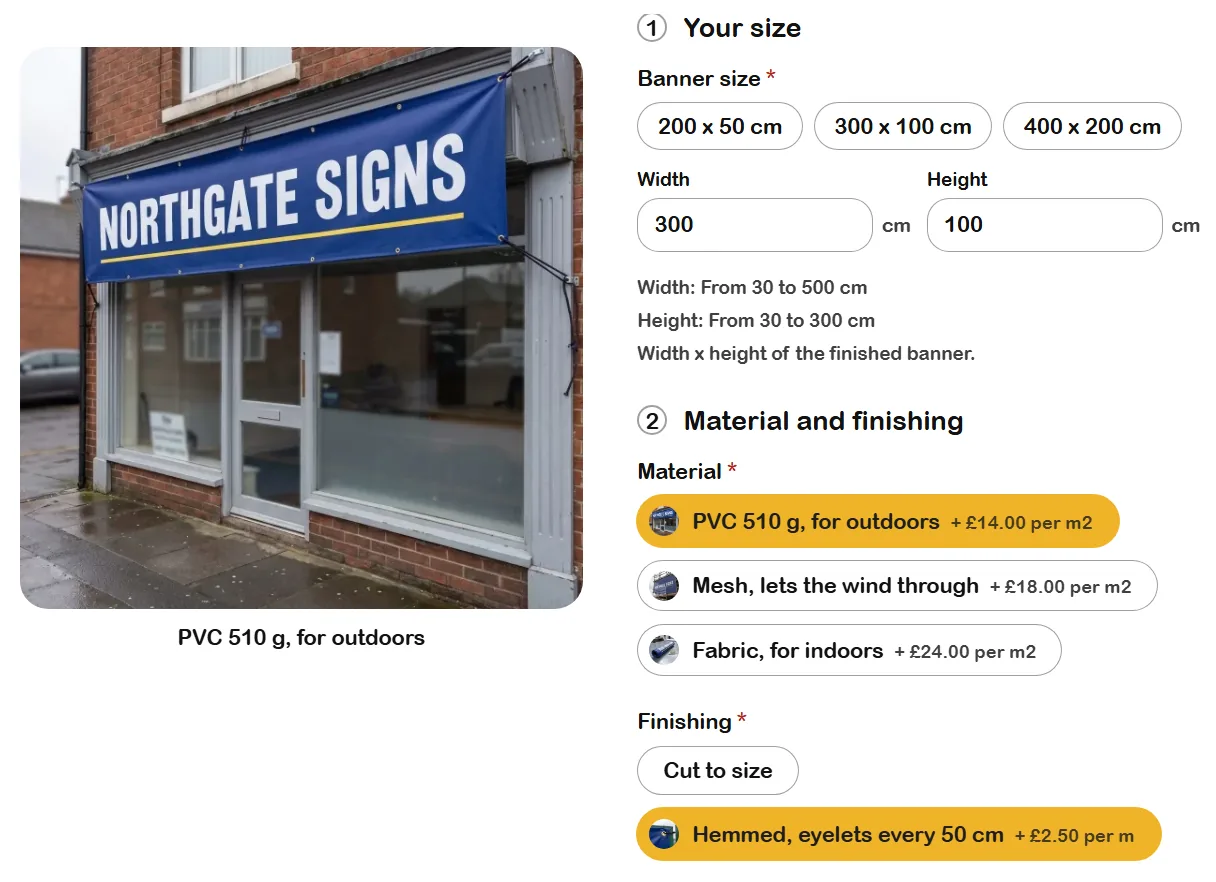
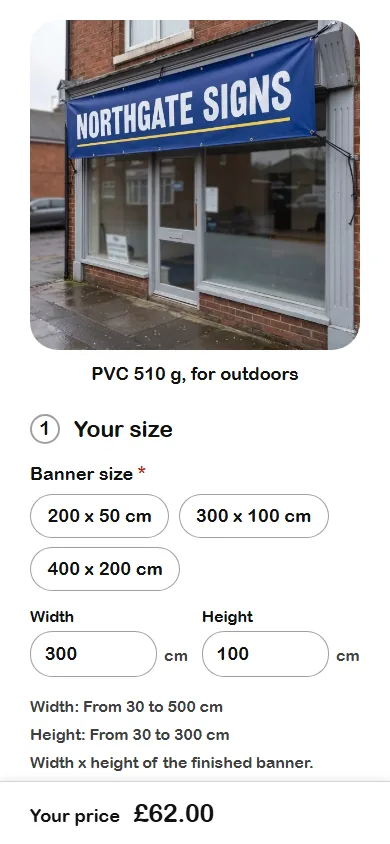
The same Northgate Signs banner on a computer and on a phone, in the showcase layout, one of six. Check the price: 300 x 100 cm is 3 square metres of PVC at £14, so £42, and 8 metres of hemmed edge at £2.50, so £20. Together £62.00, the price on the phone.
Northgate Signs' banner in the showcase layout, one of six. Pick a material and the big photo changes to it, and each material shows what it adds per square metre.
The same banner on a phone, the price pinned to the bottom. Check it: 3 square metres of PVC at £14 is £42, and 8 metres of hemmed edge at £2.50 is £20. Together £62.00.
For when the whole shop needs doing, not only the product page. You drag sections
onto the page and type straight on it, and every page comes from Craftor: the home page, the shop, the
product pages, the basket and the checkout. The parts a made to order shop sells with are already
there, a price table, a quote form, artwork upload and the day the order leaves. ConfigKit comes
inside, so you never pay for both.
A quote form just dropped onto Northgate Signs' home page. Type straight on the page, or set its words and what it asks for on the left.A quote form's own settings in the editor: its heading, its words, and whether it asks for sizes and lets them send files. Or type straight on the page.
Build a whole shop: pick the trade nearest yours, give it your shop's name, and every page is made for you.
A product page Craftor made for Northgate Signs, with ConfigKit's three steps on it.
Five starter shops come with it, each with its pages, example products,
photos and a configurator already priced. Or pick any other trade and say what you make.
Then you need neither of these. Both are plugins of their own, and PriceWise does its job without them.
Looking for StoreWise?
It is part of Craftor now. Its four starter shops are four of the five above, and with Craftor you can change every page of them yourself.
Does your job not fit?
If what you make is nothing like these shops, write to me and tell me how you price it. I answer myself, and if none of the three can do it yet, I want to know.
Add PriceWise Pro to your store. Customers configure their product, watch the price update live, and check out, or download a branded PDF quote. You just collect the orders.