Some jobs you price by hand, and some customers want a price in writing before they pay. ConfigKit can take a quote request instead of a sale, or next to it. The request arrives with every choice, the price the configurator worked out and any files, and one click turns it into an order the customer can pay.
- Basket, quote, or both
- What the customer does
- What arrives
- Turn a quote into an order
- Protection from abuse
Basket, quote, or both
In the builder, Price and settings, Selling, “How customers buy” has three choices:
- Add to basket and pay: a normal sale. A configurator you start empty starts on this one; some templates start on a quote or on Either.
- Ask for a quote (no basket): the buy button becomes Ask for a quote. With this one you can also switch on “Hide prices from customers”: the page and the shop lists then say “Price on request”, and the price only reaches you.
- Either: add to basket, or ask for a quote: the normal buy button, and an “Or ask for a quote” button under it.

“Send requests to” takes the email address this configurator’s requests go to. Empty means the address in ConfigKit, Settings, which is the site’s admin email until you set another.
What the customer does
They configure exactly as for a sale, then click the quote button. A short form opens: Your name, Email, Phone (optional) and “Anything else we should know (optional)”. Send my request checks the choices the same way the basket would, and the page thanks them and says a copy is on its way to their email (unless you send no copies, below).
What arrives
- An email to you, with every choice, the price, links to any files, and a PDF of the request. Reply to it and your answer goes straight to the customer.
- A copy to the customer, with the same choices and the PDF, and the price unless you hide prices. When prices are hidden, your email says the customer did not see them. To send no copy, switch off “Copy to the customer” in ConfigKit, Settings: the customer then sees a thank you on the page, and only you get an email.
- A record in ConfigKit, Quote requests, with everything above, the PDF to download and the files.
Turn a quote into an order
Open the request
ConfigKit, Quote requests: the menu shows how many are waiting, and new ones are marked New in the list on the left. Click one to see it in full on the right. All, New, Replied and Orders at the top narrow the list.
Click Make it an order
ConfigKit makes a pending order for the customer at the quoted prices, with every choice on its lines. You can still change the order, for example to adjust the price after a phone call.
Send the payment link
The request now shows “Payment link for the customer” with a Copy button, and a button to open the order. Send them the link, by Reply by email or any way you like. They pay with WooCommerce’s payment page and your normal checkout, and the request shows which order it became.
The buttons on the right of a request change as it moves on:
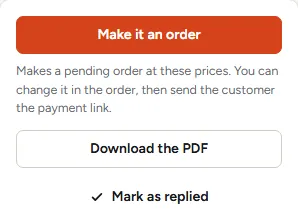
- Make it an order makes the pending order. Once it is made, Open order takes its place, with the payment link and its Copy button until the order is paid.
- Download the PDF gives you the same PDF as the one in your email.
- Mark as replied, once you have answered by email, moves a request out of New, and Mark as new again puts it back.
Protection from abuse
A quote form sends an email to an address the visitor types, so it has limits: 10 requests an hour from one visitor’s address, 5 copies a day to one email, and a hidden field that robots fill in and people never see. The customer’s copy never repeats the name or message typed in the form, so nobody can use your shop to send their own words to a stranger. A developer can change the limits with the ckit_quote_limits filter.
Was this page helpful?
Thanks for telling us.
Sorry it did not help. Tell us what you were looking for and we will add it.