If you sell flooring, glass, banners or fabric, your customer does not pick a price from a list. They type a size, and the size decides the price.
Extra Product Options is one of the best-known option plugins for WooCommerce, and it is very good at the job it was made for: extras with fixed prices, like gift wrap or engraving. When your price depends on the size, you end up writing a math formula for every product, and keeping it right when your prices change.
In this guide I show the difference with one real product, a flooring product, with pictures from a real WooCommerce shop. I built PriceWise, so I will also tell you when Extra Product Options is the better pick.
In short: Extra Product Options adds choices that each cost a fixed amount. PriceWise works the price out from the size the customer types, and the area, the extra for cuts, the full boxes and the minimum charge are settings you fill in, not a formula you write. If your price depends on size, that is the work PriceWise takes off you. If it does not, Extra Product Options is a good fit, and ThemeHigh’s free version may be all you need.
First, which Extra Product Options do you have?
Two different companies sell a plugin with this name:
- Extra Product Options by ThemeHigh. Free on WordPress.org, with 30,000+ active installs and 4.9 stars from 219 reviews. Pro costs $39 a year for one site.
- Extra Product Options & Add-Ons by ThemeComplete. $129 on CodeCanyon, with 36,626 sales and 4.87 stars, or €49 a year from their own site.
Both have years of work behind them. Below, “Extra Product Options” means both, unless I name one.
Why a size price is different
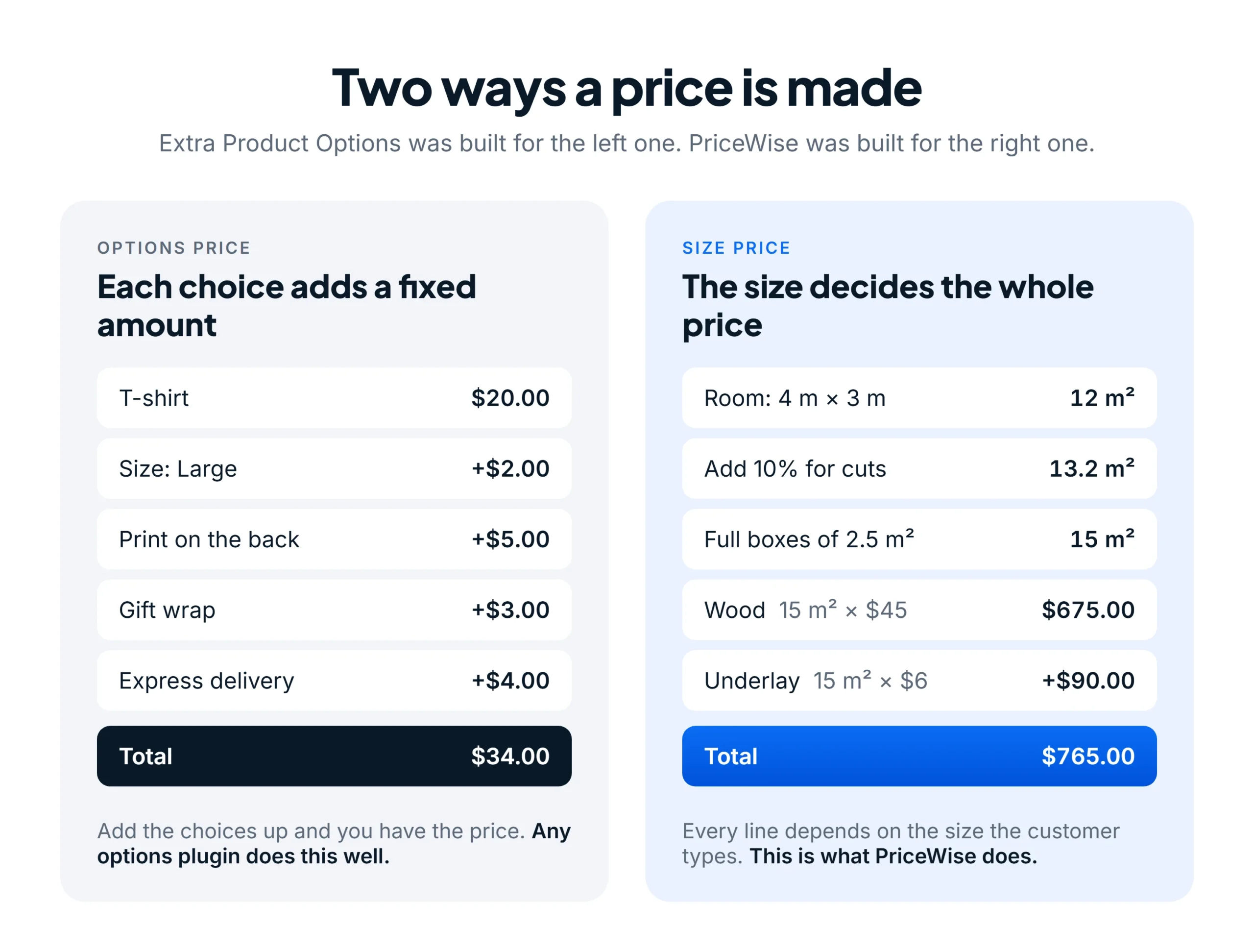
Most products are priced the first way. A T-shirt costs $20, and every choice adds a fixed amount on top. Extra Product Options was built for this, and it does it well.
Made-to-measure products work the second way. The customer types 4 m by 3 m, which is 12 m². You add 10% for cuts, which makes 13.2 m². Flooring comes in boxes of 2.5 m², so you sell 15 m². Every price on the page now comes from that 15: the wood, the underlay, the fitting.
That second kind of price is the one PriceWise was built for.
The example: a flooring product with a live price
Here is the product on my own store: an ordinary WooCommerce product page with PriceWise on it. You can open the flooring demo and try it yourself, on a computer or on a phone.

What the customer does:
- Types the width and the length of the room.
- Picks the floor.
- Ticks the extras they want.
The price changes as they type, and the size they will get (15 m²) sits right next to what they typed, so nobody is surprised at the checkout. In the basket the price stays $765.00, and every choice is saved with the order, so you know exactly what to pack.
You also choose how the calculator looks. PriceWise has three display styles, and you pick one for each calculator: every field on one card, one question at a time, or inline with no card, so it takes your theme’s own look. Here is the same flooring calculator in all three:

What you set up in PriceWise
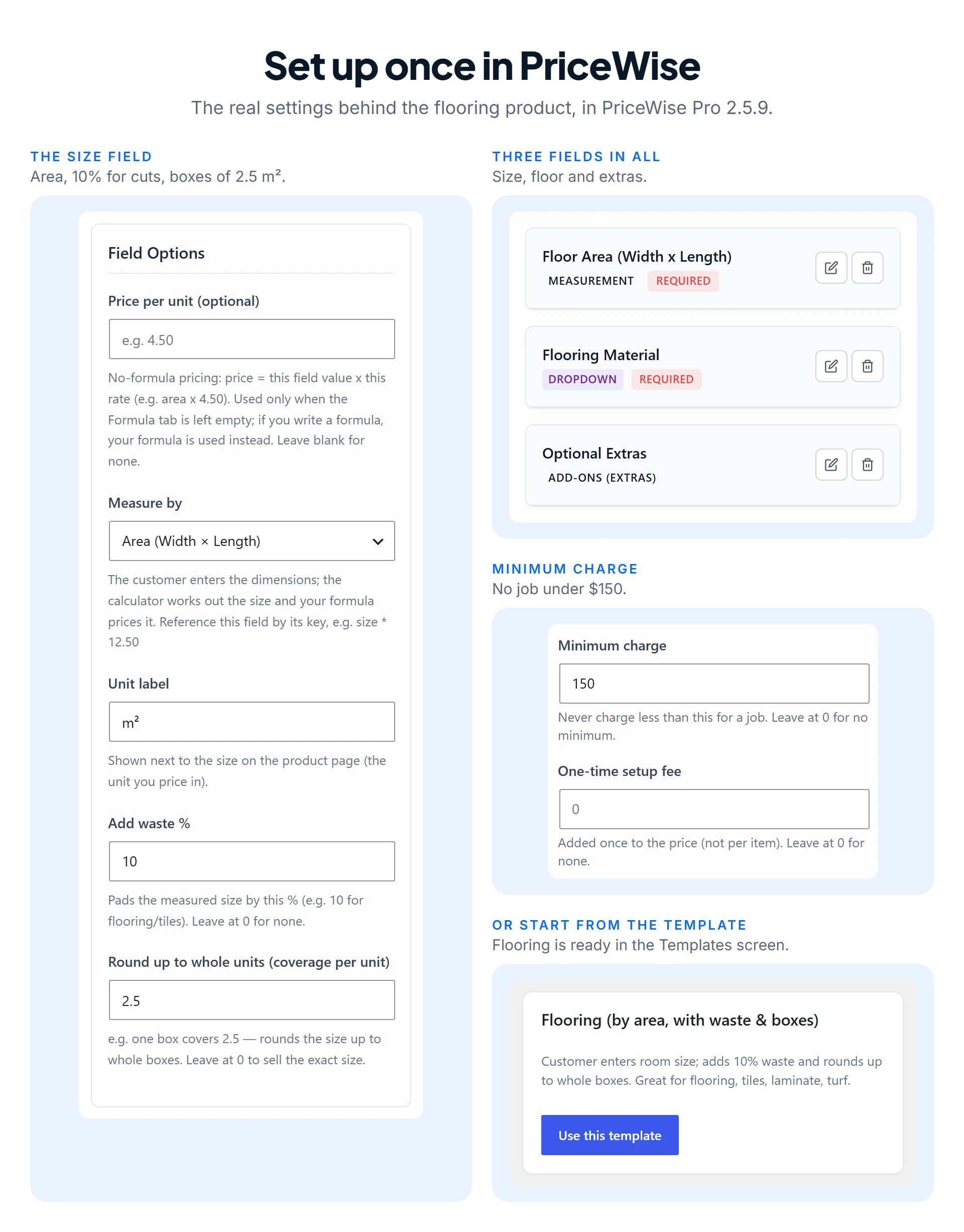
Here is where each step of that price goes in each plugin:
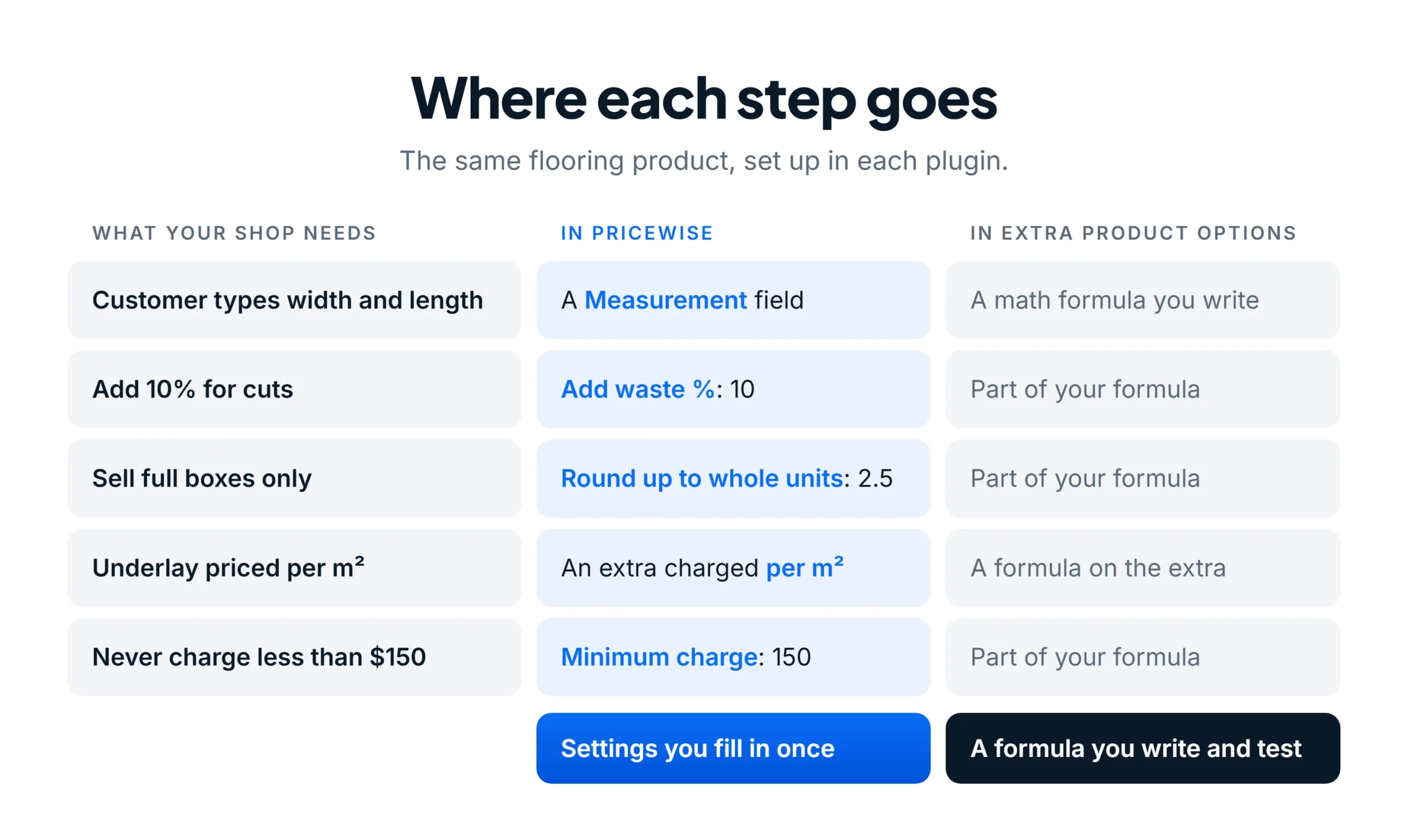
The size is a field of its own. You choose “Area (Width × Length)”, type the unit, and fill in two boxes: Add waste % (10) and Round up to whole units (2.5, the area one box covers). The customer can never buy half a box.
The smallest job is a setting too. Type 150 in Minimum charge, and no order for this product will ever cost less than $150, however small the room.
The floors go in a dropdown with their price per m², and the underlay is an extra charged per m², so it grows with the room. You still write one short line, floor area × material, so PriceWise knows what to multiply. The waste, the boxes and the minimum stay out of it.
You do not have to start from nothing either. PriceWise comes with a ready Flooring template that sets up the size field with 10% waste and full boxes for you. You change the prices and you are done.
The same product in Extra Product Options
Both Extra Product Options plugins can work a price out from what the customer types, through a formula you write:
- ThemeComplete has a math formula price. Their own demo product prices a size with
({width}/1000) * ({height}/1000) * 180 * {quantity}. The extra for cuts, the full boxes and a minimum charge would go into that formula too; I found no separate setting for them on their pages. - ThemeHigh Pro has a Custom Formula price that can read the numbers a customer types. Their documentation shows no width by length example, so ask them before you buy it for this job. Their free version cannot price by area; their support team said so on the WordPress.org forum.
A formula can work. But it is one more thing to get right on every product, and to fix every time your prices or your box sizes change.
PriceWise vs Extra Product Options, side by side
| PriceWise | ThemeHigh | ThemeComplete | |
|---|---|---|---|
| Free version | Yes, prices from a formula with a live total | Yes, 20 field types, no prices | No |
| Paid, one site | $49 a year, or $99 once | $39 a year | $129 on CodeCanyon, or €49 a year |
| Size as its own field | Yes: area, length, volume or weight | Through a Custom Formula (Pro) | Through a math formula |
| Extra for cuts and full boxes | Two settings | In your formula | In your formula |
| Minimum charge | A setting | Not on their pages | In your formula |
| Extras priced per m² | Yes | Through a formula | Through a formula |
| Track record | 50+ stores, 5 stars from 12 reviews | 30,000+ installs, 4.9 stars from 219 reviews | 36,626 sales, 4.87 stars |
Which one should you pick?
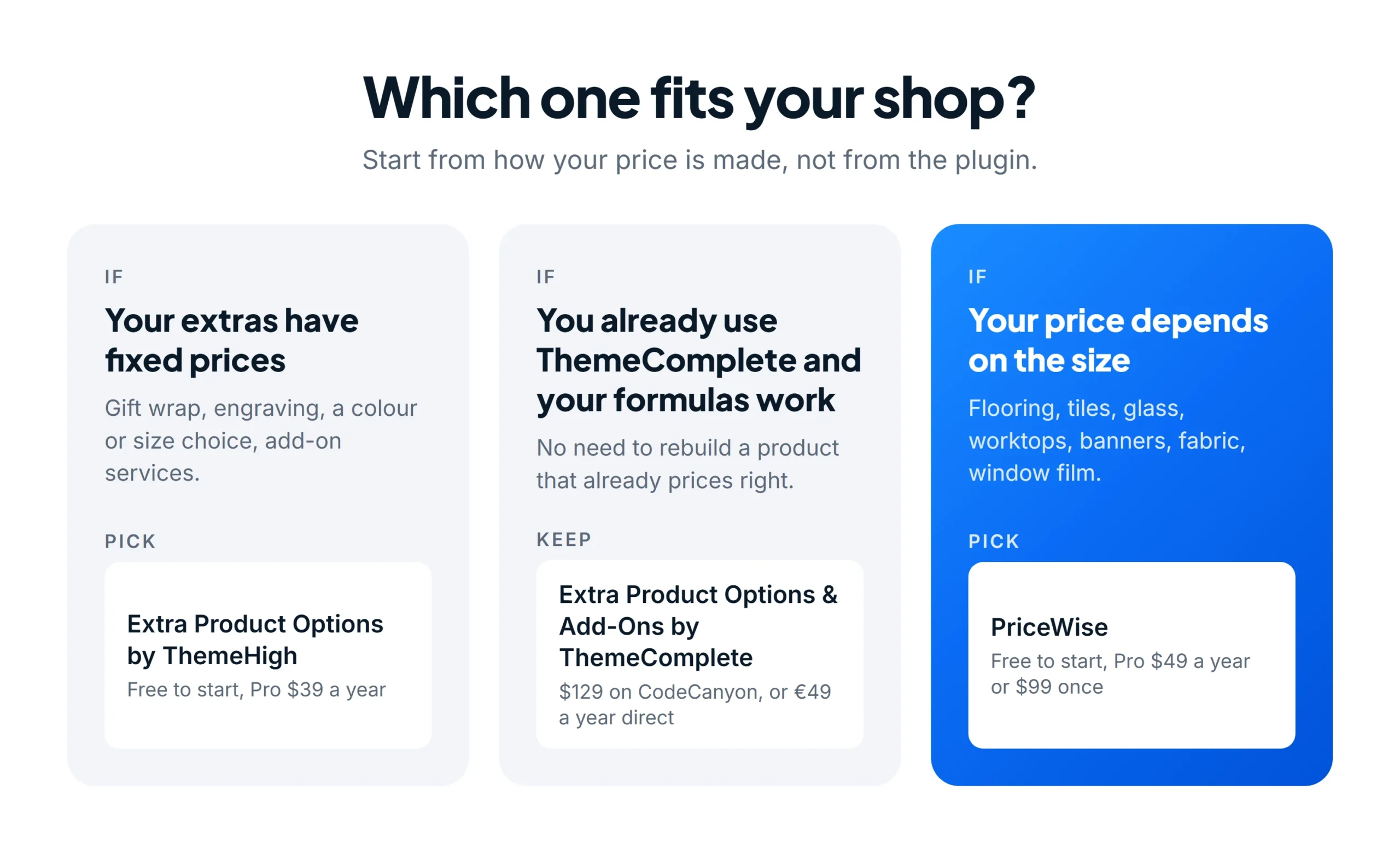
If every extra has a fixed price, ThemeHigh’s free version may be all you need. If you already run ThemeComplete and your formulas price correctly, there is no reason to rebuild. If the size decides the price, PriceWise turns the formula work into settings.
Questions shop owners ask
Do I need to be good at maths to use PriceWise? No. For the flooring product you pick the size field, fill in the waste, the box size and the minimum charge, and write one line: floor area × material. Or start from the Flooring template and only change the prices.
Can PriceWise do normal options too? Yes. Dropdowns, tick boxes, radio buttons, sliders, file uploads, dates and show-and-hide rules are all in PriceWise Pro, with 15 field types in all.
Can I try it before I pay? Yes. The free version on WordPress.org already prices from a formula with a live total. Pro adds the size field, extras per m², the minimum charge and more, and comes with a 14-day refund.
Is PriceWise cheaper than Extra Product Options? Not always. ThemeHigh Pro is $39 a year and PriceWise Pro $49. ThemeComplete is $129 on CodeCanyon or €49 a year. PriceWise also has a lifetime plan: $99 once for one site.
How long does it take to set up a product? You set each product up once. The templates for flooring, curtains, topsoil, fabric and more give you a head start, so most of the work is typing your own prices.
My take
Extra Product Options, in either version, is a good plugin when your products are choices with fixed prices. But if you sell by size and keep writing formulas for waste, boxes and minimum charges, that work never really ends.
That is the job PriceWise Pro was built for: $49 a year, or $99 once. Try the flooring demo and the other live demos first; they are ordinary products on my store, not mock-ups. I wrote the same kind of comparison for Advanced Product Fields and YITH Product Add-Ons, if those are on your list too.
Checked on 23 October 2026: prices and ratings on ThemeHigh’s product page, the WordPress.org listing, ThemeComplete on CodeCanyon and themecomplete.com. Their documentation and demo store were read on 13 September 2026. The product pictures are my live flooring demo; the setup screens come from a test shop running PriceWise Pro 2.5.9. All three plugins update often, so check before you buy.