Besides the pages a shop sells from, most shops need the same few: about the shop, the people, how to get in touch, questions, delivery. Craftor has them ready. Put one in, then change the words and photos to your own. Every page and section takes your colours and fonts.
A whole page in one go
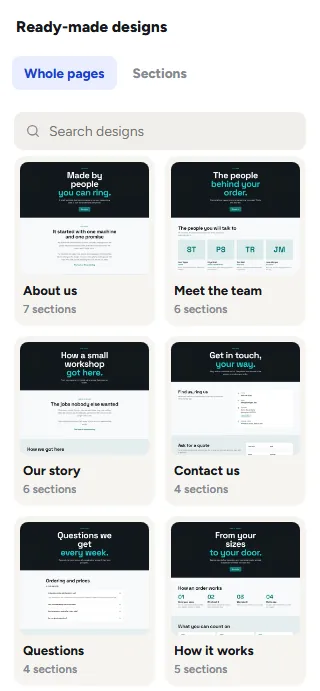
Open an empty page in the editor and it offers the ready-made pages: click one and all its sections go in. On a page that already has sections, open Designs and pick Whole pages, then drag one onto the page or click it: it goes in below what is there, nothing is replaced, and Ctrl Z takes the whole page back out. In the Pages panel, each ready-made page can also start a new page, with its title, as a draft, and so can Start a page from a ready-made design on the Craftor screen in wp-admin.
- About us: a page head, your story beside a photo, a few numbers, what you stand for, the people, a word from the owner and a way to get in touch.
- Meet the team: the people, four in a row, the owner’s word, your promises and your numbers.
- Our story: how the shop started, year by year, and who it makes things for.
- Contact us: your phone, email, address and hours, the quote form, and the questions people ask before they get in touch.
- Questions: ordering and prices, delivery and returns, answered in plain words.
- How it works: the steps from sizes to delivery, what customers can count on, and questions about ordering.
- Our work: photos of real jobs, your product reviews and the businesses you make things for.
- Delivery and returns: how orders are sent, the small print in plain words, and delivery questions.
The About sections
In Designs, under Sections, the group About your shop holds the sections an About page is made of, each in a ready-made design or two; Numbers and Who we work for are under Reviews and trust. As plain blocks, to fill in yourself, they are all under Add, Sections.
- Our story: where you started, beside one photo or two, with a round label on the photo and a name to sign it.
- Numbers: up to six big numbers, the year you started, orders made, people in the workshop, plain or on cards.
- The people: a photo, a name, what they do and a line about them, in tall or round photos, two to four in a row.
- Our history: the shop year by year, one under the other or side by side.
- What we stand for: your promises, each with an icon you pick, a title and a few words.
- Who we work for: the logos or names of the businesses you make things for, in grey until pointed at, each with a link if you want one.
- A word from the owner: one thing the owner wants every customer to know, big, with their photo and name.
Photos
In the editor, a section waiting for a photo shows a box where it goes: click it to pick one from the Media Library, or use the section’s settings on the left. Without a photo the live page does without one: the story and the owner’s words sit centred on their own, and a person with no photo shows their first letters in your colours.
Made-up words
The people, numbers, years, customers, promises and quotes these sections start with are examples, there so the page reads well while you build it. A section says so until you have put your own in, line by line, and Publish asks before putting any of them live, so a visitor never reads an invented customer or number as true.
Numbers that count up
Numbers count up from nought the first time they scroll into view. A year never counts, a number already on the screen when the page opens stays as it is, and nothing moves for visitors who have turned motion off. Switch it off under the section’s Style tab.
Was this page helpful?
Thanks for telling us.
Sorry it did not help. Tell us what you were looking for and we will add it.