Besides the pages you build and the product and shop pages, a shop has pages WordPress makes for you: a page for each blog post, the blog and its categories, the results of a search, and the page someone gets when a link is broken. Craftor draws each of them from a template, in your shop’s look, so no page of the shop falls back to the theme.
- Make the templates
- Blog posts
- The blog page
- Search
- The page not found
- The basket, checkout and account
Make the templates
New shop makes all four. To make one yourself, open Pages in the editor and click Blog post, Blog page, Search results or Page not found under Templates. Each starts with the sections it needs and goes live when you publish it; until then WordPress shows those pages as your theme does.
Blog posts
Write posts in WordPress as usual. The Blog post template shows any post with Breadcrumbs, the Post heading (its category, title, date, how long it takes to read and its picture, wide under the title) and the Post words (what you wrote, easy to read, with its tags), then more posts from its category and a way to the shop. Pick which post the editor shows it with at the top. A post behind a password asks for the password first.
The blog page
The Blog and its categories template shows the blog page, and each category, tag, writer and month, with page numbers. Set how many posts make a page and the columns in its Blog posts list section. Set the page for your posts under Settings, Reading (New shop makes one called Blog). The footer links the blog once it has a post, and the Blog posts section shows your newest posts on any page, such as the home page.
Search
The magnifying glass in the header opens a search box under it. Results show the products that match first, as cards with their prices, then the pages and articles, with a box to search again. Products you keep out of search, and the basket, checkout and account pages, never show. In the header’s settings, search the whole shop, only the products (the results are then the shop page), or switch search off. The Search box section puts a search box on any page.
The page not found
When a link is broken or an address is mistyped, customers get a page that says so, with a search box, a button home and one to the shop, and your popular products under it, instead of a dead end. Google still hears that the page is not there.
The basket, checkout and account
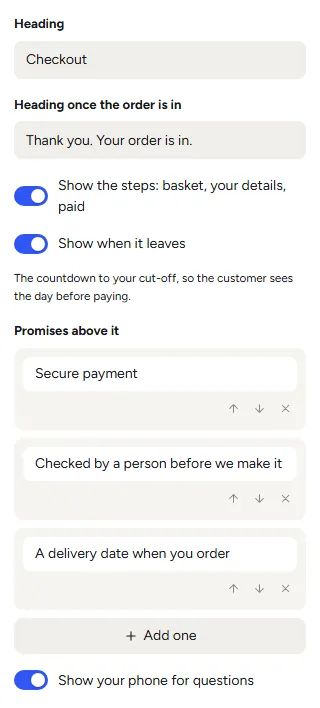
Their own sections show WooCommerce’s forms with the page’s heading, your promises and your phone for questions. Pick The checkout to change its heading and the one shown once the order is in, show the steps (basket, your details, paid), show when it leaves (the countdown, so the customer sees the day before paying), add your promises above it, and show your phone. Change the headings and promises by clicking them, like any other words.
In their Style, the forms take your layout: Form maximum width, Form position, Form layout, Space between form columns, Form text size and Field corners. WooCommerce keeps its own fields, their order and its checks, and your payment, tax and delivery settings stay in WooCommerce.
Was this page helpful?
Thanks for telling us.
Sorry it did not help. Tell us what you were looking for and we will add it.